Quick Answer
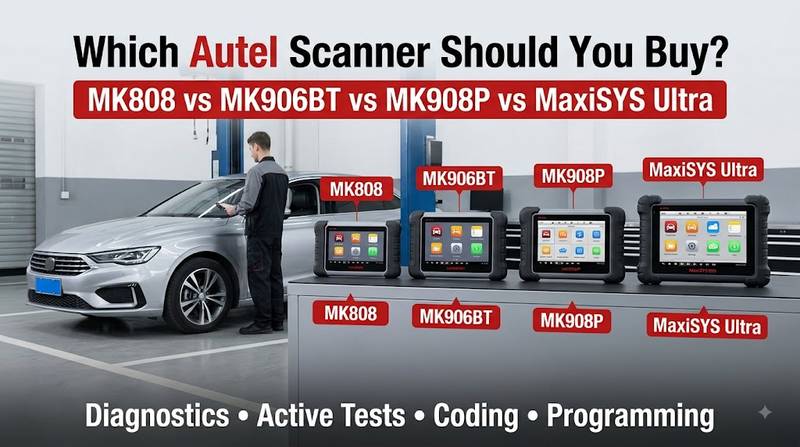
The right Autel scanner depends on the job, not simply the price or model number. MK808 suits technicians who need full-system diagnosis, active tests, and routine service functions without a programming platform. MK906BT adds wireless VCI convenience and broader coding-oriented workshop capability. MK908P is now best treated as a legacy professional platform, while MaxiSYS Ultra adds advanced diagnostics, measurement hardware and programming-oriented capability. Exact vehicle functions must still be verified.
Autel’s own coverage system is the correct place to verify whether a scanner supports a particular vehicle, module and function. Product-family claims such as “supports BMW” or “supports coding” are not precise enough for professional purchasing.
Key Takeaways
- MK808 is primarily a compact diagnostic and service platform, not a universal ECU-programming tool.
- MK906BT is better suited to workshops that want wireless VCI operation, active tests, and supported coding functions.
- MK908P remains relevant in searches and existing workshops, but new buyers should compare it with current 908-series and MaxiSYS platforms before purchasing.
- MaxiSYS Ultra adds the MaxiFlash VCMI, including oscilloscope, waveform generator, multimeter, and CAN-bus testing capability, in addition to advanced diagnostic functions.
- Coding and ECU programming are different operations.
- J2534 capability does not mean every vehicle can be programmed directly from the Autel tablet.
- A VCI connected to the tablet does not prove the VCI can communicate with the vehicle.
- Always verify vehicle, year, engine, ECU, software version, and required function before ordering.
Who Is This Autel Scanner Guide For?
This guide is intended for independent repair shops, professional automotive technicians, mobile diagnosticians and workshops deciding between different Autel diagnostic levels. It is also useful for fleet managers who maintain passenger or light-commercial vehicles. Heavy-duty fleets, construction-equipment workshops and professional automotive locksmiths should treat these four models only as reference points because their work may require different Autel product families.
General Repair Shops
A general workshop normally benefits most from:
- full-system scanning;
- live-data graphing;
- bi-directional tests;
- service functions;
- diagnostic reports;
- selected coding and adaptations.
For this type of work, MK808 and MK906BT represent different levels of workshop capability.
Advanced Diagnostic and Programming Shops
A shop replacing and programming electronic modules may need:
- coding;
- J2534 pass-thru;
- manufacturer programming software;
- advanced VCI protocols;
- stable wired communication;
- regulated battery support;
- network diagnosis.
This is where MK908P-class platforms, current MaxiSYS programming platforms and MaxiSYS Ultra become more relevant.
Heavy-Duty Fleets and Equipment Workshops
Do not assume that a passenger-car Autel scanner is the right choice for a truck simply because the truck has a diagnostic connector.
Autel currently has a separate MaxiSYS MS909CV commercial-vehicle platform for light-, medium- and heavy-duty applications.
Automotive Locksmiths
An Autel diagnostic scanner may provide immobilizer-related service functions on supported vehicles, but professional key and immobilizer work is a separate specialty.
Autel’s dedicated MaxiIM line includes key-programming platforms such as IM508 and IM608-family tools.
What Problem Are You Actually Trying to Solve With an Autel Scanner?
Before comparing Autel models, define the workshop problem that the scanner must solve. A technician who only needs DTCs, live data, and active tests does not need the same platform as a shop replacing BMW or Mercedes control modules. Many disappointing scanner purchases result from buying a model first and checking the required function afterward.
Common signs that the current scan tool is too limited include:
- Engine diagnostics work but ABS or SRS access is missing.
- Live data is available, but the required active test is absent.
- The scanner reads a module but cannot perform the required coding.
- A replacement ECU can be diagnosed but not programmed.
- The diagnostic tablet works, but its VCI does not support the required communication method.
- The tool communicates with older vehicles but lacks coverage for a newer platform.
- A function appears on another vehicle but is absent on the vehicle being repaired.
These symptoms do not automatically mean the scanner is defective. They may indicate a limitation in vehicle coverage, software version, security access, protocol support, or the specific control module.
Autel Diagnostic Functions: What Do the Terms Actually Mean?
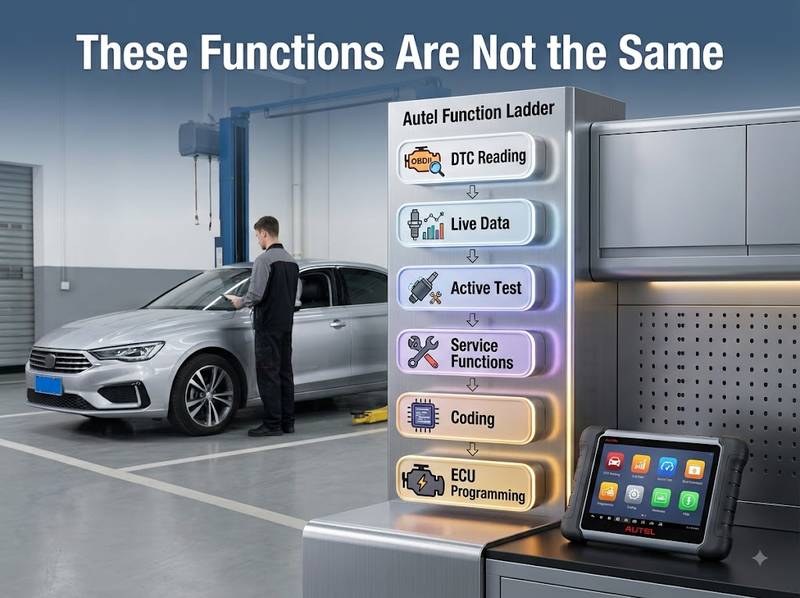
An Autel scanner can offer several levels of interaction with a vehicle, but those levels should not be treated as interchangeable. Reading codes, commanding an actuator, coding a module, and writing ECU software involve different communication procedures and different levels of risk. A professional buyer should define the exact required operation before comparing Autel models.
| Function | What It Means | Example |
| DTC Reading | Retrieve Diagnostic Trouble Codes | Read an ABS wheel-speed sensor fault |
| Live Data | Observe ECU parameters | Monitor fuel pressure or wheel speed |
| Active Test | Command a supported actuator | Run radiator fan or ABS pump |
| Service Function | Perform a guided maintenance procedure | EPB service or oil reset |
| Coding | Change module configuration | Configure supported replacement options |
| Adaptation / Relearn | Teach a value or component | Throttle or steering-angle relearn |
| Programming / Reflash | Write ECU software or calibration | Update a replacement control unit |
| Calibration | Align or calibrate a system | ADAS camera calibration |
| Software Installation | Install/update scanner or OEM PC software | Install J2534 driver or OEM programming app |
Reading Codes Is Not the Same as Diagnosing the Fault
A stored DTC identifies a condition recognized by the control module. It does not automatically identify the failed component.
A sensor-related DTC can still be caused by:
- missing power;
- poor ground;
- wiring damage;
- connector corrosion;
- network communication;
- another controller;
- the sensor itself.
Use the Autel scanner to guide testing, not to replace electrical and mechanical diagnosis.
Active Test Is Not Coding
An active test temporarily commands an actuator so the technician can evaluate its operation.
Coding changes configuration or stored settings.
A scanner that performs active tests does not automatically support coding on the same module.
Coding Is Not ECU Programming
Coding generally configures data already supported by a control module.
Programming writes software or calibration into controller memory.
Autel’s MaxiFlash products can provide SAE J2534 pass-thru capability, but J2534 hardware alone does not supply every manufacturer’s programming software or authorization.
Autel MK808 vs MK906BT vs MK908P vs MaxiSYS Ultra: Quick Decision Table
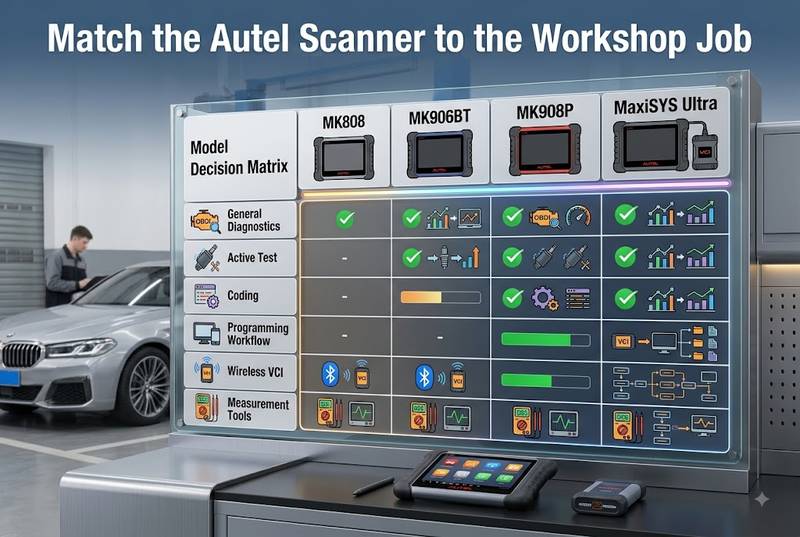
The fastest way to choose among these models is to decide how far beyond normal diagnosis the workshop needs to go. MK808 is the practical diagnostic/service choice; MK906BT moves toward a more flexible wireless workshop platform; MK908P represents an older programming-capable generation; MaxiSYS Ultra combines high-end diagnostic software with the VCMI measurement and communication system.
| Model | Best Fit | Active Tests | Coding | Programming-Oriented Hardware | Main Reason to Choose |
| MK808 | General diagnostics/service | Yes, supported vehicles | Limited/model-dependent | No dedicated J2534 programming package | Compact full-system work |
| MK906BT | Independent workshop | Yes | Supported coding functions | Not positioned like Ultra/J2534 programming systems | Wireless VCI + coding level |
| MK908P | Legacy professional shops | Yes | Yes, supported vehicles | MaxiFlash/J2534 configurations | Existing professional platform |
| MaxiSYS Ultra | Advanced diagnostic/programming shop | Yes | Advanced supported functions | MaxiFlash VCMI | Diagnostics + measurement + programming workflow |
Important: This table describes platform positioning, not universal vehicle coverage. Always verify the exact vehicle and function in Autel’s coverage information before purchasing.
Autel MK808: Who Should Buy It?
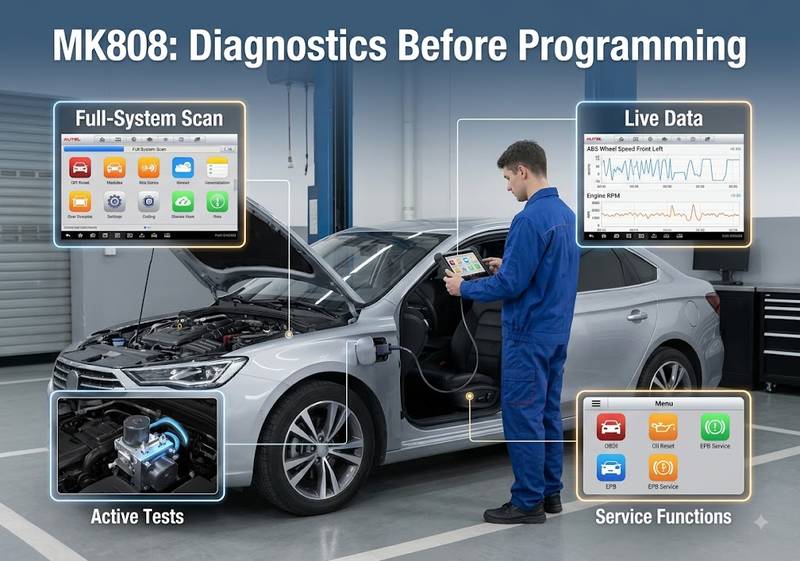
The MK808 is best suited to technicians who need broad system diagnostics, live data, active tests, and common service functions in a compact tablet without paying for a high-end programming platform. Autel’s official MK808 documentation lists read/clear codes across available systems, live data, active tests and multiple service procedures. It is a practical diagnostic tool rather than a universal ECU-flashing solution.
Autel lists the original MK808 with:
- 7-inch display;
- full-system code functions;
- live data;
- active tests;
- service functions;
- AutoVIN;
- DPF regeneration;
- steering-angle reset;
- battery registration;
- TPMS relearn.
MK808 Makes Sense If You:
- perform general mechanical repairs;
- need more than an engine-code reader;
- regularly diagnose ABS, SRS and other control systems;
- use active tests to confirm components;
- perform routine maintenance resets;
- do not need a dedicated ECU-programming platform.
MK808 Is Less Suitable If You:
- frequently replace and reflash ECUs;
- require J2534 programming as a core workshop service;
- need advanced oscilloscope/network measurement integrated into the scanner;
- need a dedicated professional key-programming platform.
Important 2026 Buying Note
The name MK808 now appears alongside newer variants such as MK808Z and MK808BT Pro in current Autel catalogs. A buyer should therefore confirm the exact suffix and hardware generation instead of assuming every “MK808” listing has identical specifications.
Autel MK906BT: Where Does It Fit?
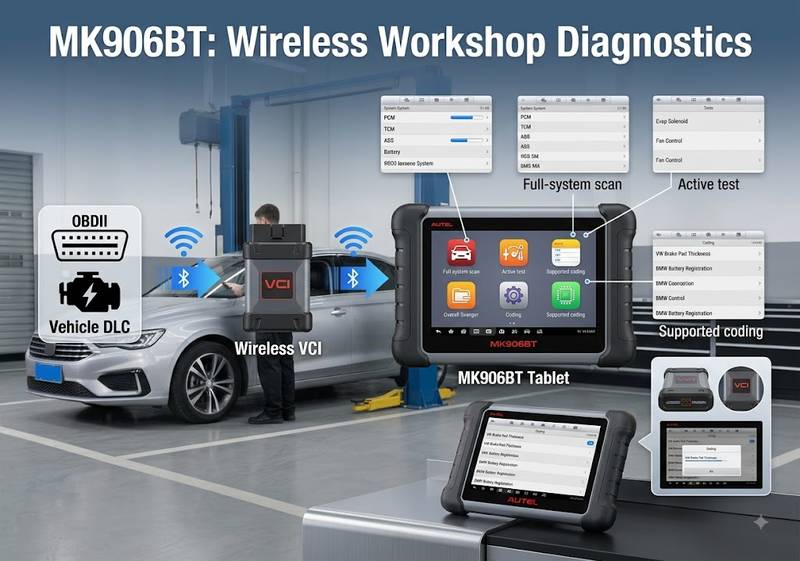
The MK906BT sits between compact service-focused scanners and higher-end programming platforms. Autel currently describes the MK906BT as an 8-inch diagnostic tablet focused on ECU coding and active testing, with Bluetooth vehicle communication. It is a strong fit for an independent shop that wants wireless full-system diagnosis and selected coding functions without moving immediately to an Ultra-class platform.
Autel’s current product information lists:
- 8.0-inch display;
- wireless VCI;
- full-system diagnostics;
- live data;
- active tests;
- adaptations;
- supported ECU coding;
- multiple maintenance functions.
MK906BT Makes Sense If You:
- operate a small or medium independent workshop;
- diagnose multiple systems every day;
- want wireless operation around the vehicle;
- regularly use bi-directional controls;
- need supported coding and adaptations;
- do not regularly need integrated oscilloscope or advanced programming hardware.
Do Not Assume “ECU Coding” Means Universal Programming
The presence of coding functions does not mean the MK906BT can flash every replacement ECU.
For any specific job, verify:
vehicle + model year + control module + required coding/programming operation.
Autel’s vehicle coverage system is more reliable than a generic product feature list for this purpose.
Is the Autel MK908P Still Worth Buying?
MK908P remains relevant for workshops that already own the platform, buyers considering used or remaining inventory, and technicians searching for its J2534 capabilities. However, it belongs to an older Autel generation. A new buyer in 2026 should compare the exact MK908P package against newer models such as MK908 II, MS908S Pro II, MS909, or other current MaxiSYS systems before committing.
MaxiFlash J2534 hardware has historically been used with MK908/MK908P and other MaxiSYS platforms for pass-through programming functions.
However, the current Autel catalog emphasizes newer platforms such as:
- MK908 II;
- MS908S Pro II;
- MS909;
- MaxiSYS Ultra;
- MaxiSYS Ultra S2.
Consider an MK908P If:
- you already own it, and it covers your workload;
- the unit has a known update and registration history;
- the included MaxiFlash/J2534 hardware matches your programming workflow;
- the cost is significantly different from an appropriate newer platform.
Be Cautious If:
- seller cannot verify registration;
- update history is unknown;
- J2534 hardware is missing;
- battery condition is poor;
- the required modern vehicle coverage has not been confirmed;
- the price approaches a newer current-generation platform.
The decision should be based on total workshop capability and support status, not the old model’s original flagship positioning.
What Does MaxiSYS Ultra Add?
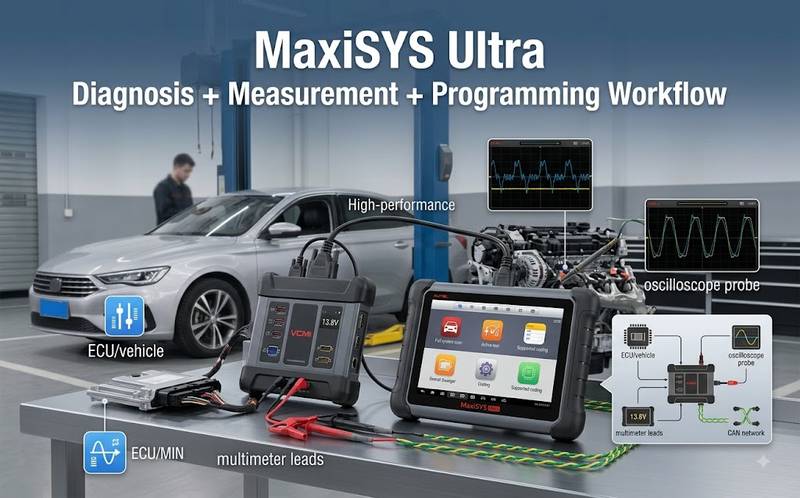
MaxiSYS Ultra is intended for shops that need more than scanning and coding. Autel combines its high-end diagnostic tablet with the MaxiFlash VCMI, which serves as a vehicle communication and measurement interface. The official Ultra specification includes oscilloscope, waveform generator, multimeter, and CAN-bus testing functions, making the platform particularly useful for technicians who perform electrical and network diagnosis as well as advanced programming work.
Autel lists the original Ultra with:
- 12.7-inch display;
- 256 GB internal storage;
- advanced diagnostics;
- topology-related diagnostic functions;
- advanced coding and programming capability;
- MaxiFlash VCMI;
- 4-channel oscilloscope;
- waveform generator;
- multimeter;
- CAN-bus tester.
Ultra Makes Sense If Your Shop Regularly Performs:
- advanced electrical diagnosis;
- module communication diagnosis;
- network troubleshooting;
- coding;
- programming;
- pre- and post-repair system scans;
- complex multi-system diagnosis.
Ultra May Be Excessive If:
your daily work is mostly:
- check-engine diagnosis;
- brake jobs;
- oil resets;
- basic service procedures;
- occasional active tests.
A technician who never uses the VCMI measurement functions may obtain little benefit from paying for an Ultra-level platform.
Buying a New Autel Scanner in 2026: Check the Generation, Not Just the Name
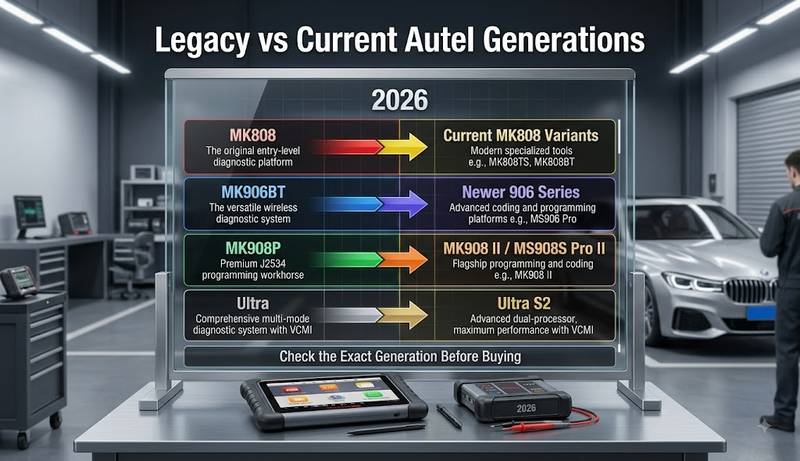
Autel’s product range changes over time, so a comparison based only on familiar names can lead to an outdated purchase. The current official catalog includes newer products such as MK908 II, MK906S Pro, MK808BT Pro and Ultra S2 alongside older models still found in the market. Buyers should therefore compare the exact hardware generation, VCI, and subscription before using older comparison charts.
This is particularly important when searching for:
- MK808;
- MK906BT;
- MK908P;
- MaxiSYS Ultra.
The model family may now contain several versions with different:
- processors;
- Android versions;
- memory;
- VCIs;
- communication protocols;
- update packages.
Do not treat an old review as proof of the specifications of a current listing.
Tools and Preparation Before Using an Autel Scanner
Reliable diagnosis requires the scanner, vehicle, and communication path to be prepared correctly. Before troubleshooting software or replacing a VCI, confirm the vehicle battery condition, correct diagnostic connector, scanner registration, software coverage, and physical communication hardware. For coding or programming, stable vehicle power and the correct wired communication method become substantially more important.
Prepare:
- correct Autel tablet;
- correct VCI where applicable;
- main diagnostic cable;
- vehicle-specific adapter where required;
- stable vehicle battery;
- regulated battery support for programming when required by the service procedure;
- current or required Autel software;
- Wi-Fi when registration, updates or online functions require it;
- USB cable for applicable VCI/programming workflows;
- VIN and vehicle identification;
- manufacturer repair/programming information.
Autel manuals note that USB provides the most stable tablet-to-VCI connection on applicable platforms and recommend it for ECU coding or programming workflows.
Autel Scanner Cannot Communicate: What Should You Check First?
When communication fails, do not immediately blame the scanner or the vehicle ECU. First identify where the communication chain stops. Autel’s own troubleshooting documentation separates tablet-to-VCI communication from VCI-to-vehicle communication. Check inexpensive and easily verified causes first: power, pairing, cable, vehicle selection, DLC connection, and fuse condition before moving into CAN-network or module diagnosis.
The table below is sorted by check cost and diagnostic efficiency, not claimed statistical probability.
| Priority | Possible Cause | First Action |
| 1 | Incorrect vehicle/VIN selection | Re-identify vehicle |
| 2 | VCI not paired to tablet | Check VCI Manager/status |
| 3 | Loose cable or adapter | Reconnect and inspect |
| 4 | No DLC power / blown fuse | Check vehicle fuse and DLC supply |
| 5 | Wrong adapter | Confirm vehicle connector |
| 6 | Wireless interference | Move closer or use wired connection |
| 7 | VCI/software mismatch | Verify update/firmware |
| 8 | Unsupported module/function | Check Autel coverage |
| 9 | Vehicle wiring/network fault | Diagnose vehicle network |
| 10 | Scanner/VCI hardware failure | Test on known-good vehicle/tool |
Autel specifically lists loose connections, blown vehicle fuses, vehicle/data-cable wiring faults, adapter faults and incorrect vehicle identification among possible causes of communication failure.
Tablet or Computer Cannot Detect the VCI vs VCI Cannot Detect the Vehicle.
These are two different faults and should never be diagnosed with the same procedure. If the tablet or Windows PC cannot detect the VCI, focus on power, USB, Bluetooth/Wi-Fi pairing, drivers, and VCI firmware. If the VCI is connected correctly but the vehicle cannot be identified, move toward DLC power, vehicle wiring, selected protocol, gateway, and vehicle coverage.
Situation A: Autel Tablet Cannot Detect the VCI
Check:
- Is the VCI powered?
- Is the correct VCI selected?
- Is Bluetooth/Wi-Fi enabled?
- Is the tablet close enough to the VCI?
- Is signal interference present?
- Does a direct USB connection work?
- Does the VCI connection indicator show the selected communication mode?
These checks follow Autel’s own communication troubleshooting sequence.
Situation B: Windows PC Cannot Detect MaxiFlash J2534
For OEM pass-thru programming:
- Confirm the MaxiFlash hardware is powered.
- Use a known-good USB cable.
- Confirm the Autel/J2534 driver is installed.
- Check Windows Device Manager or the vendor’s J2534 configuration utility.
- Confirm the OEM software recognizes the intended pass-thru device.
- Verify the OEM application and Windows version requirements.
Software installation is separate from vehicle programming.
Situation C: VCI Is Connected, but Vehicle Does Not Communicate
Check:
- Correct VIN and vehicle selection.
- Ignition state.
- DLC connection.
- Vehicle fuse supplying the diagnostic connector.
- Main cable and adapter.
- Whether generic OBD communication works.
- Whether all modules or only one module fail.
- Actual Autel vehicle/function coverage.
Autel recommends testing whether other compliant vehicles communicate normally when diagnosing repeated linking failures.
Step-by-Step Autel Communication Troubleshooting Workflow
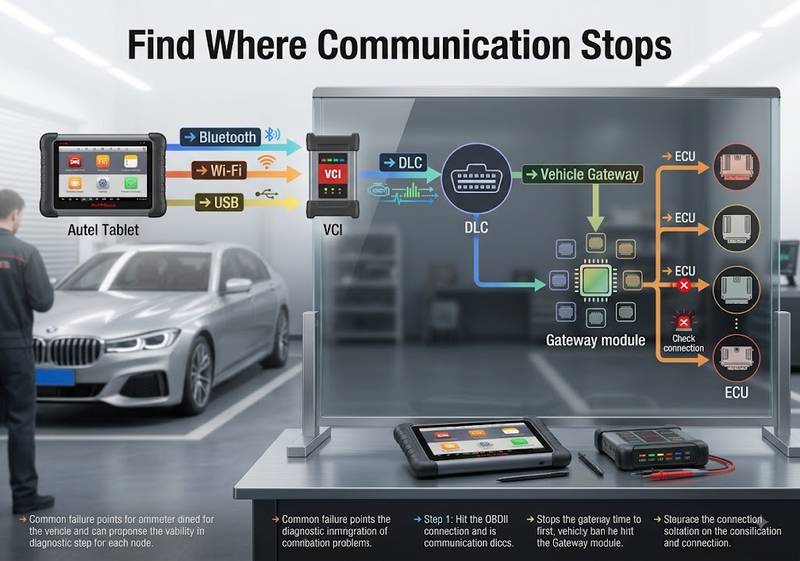
A structured troubleshooting sequence prevents unnecessary scanner resets and parts replacement. Start at the physical connection and work inward toward the vehicle network. First prove the tablet and VCI communicate. Then prove the VCI communicates through the DLC. Next determine whether the failure affects every module or a single controller. Only after those checks should software coverage or vehicle-network faults become the main suspects.
Step 1 — Verify the Vehicle
Record:
- make;
- model;
- year;
- engine;
- VIN;
- target ECU;
- target function.
If AutoVIN produces an unexpected result, identify the vehicle manually before proceeding.
Step 2 — Verify Scanner-to-VCI Communication
On wireless models:
Tablet → VCI Manager → Correct VCI → Connected
A successful tablet-to-VCI connection does not yet prove vehicle communication.
Step 3 — Verify DLC Power and Connection
An OBD-II vehicle normally supplies communication and vehicle power to the VCI through the standardized diagnostic connector. Autel’s MaxiSYS documentation describes the J1962 DLC as supplying both communication and 12-volt power on applicable OBD-II vehicles.
If the VCI does not power:
- inspect DLC;
- check relevant fuse;
- check connector damage;
- consult the vehicle wiring diagram.
Do not apply external power to unidentified pins.
Step 4 — Try Generic OBD Communication
If generic OBD works but manufacturer-specific diagnosis does not:
- verify vehicle selection;
- verify software coverage;
- determine whether the specific module/function is supported.
Step 5 — Determine Whether One Module or All Modules Fail
All modules offline: investigate common communication, DLC, gateway, or scanner issues.
One module offline: investigate that ECU’s power, ground, network circuit, and related DTCs.
Autel’s support documentation makes the same distinction when troubleshooting all-module versus single-module communication failures.
Step 6 — Check Software and Coverage
Use Autel’s official vehicle-coverage information to confirm:
tool → vehicle → function.
Do not assume that a function shown for one model year or ECU version applies to another.
Step 7 — Use Wired Communication for High-Risk Work
On supported Autel platforms, use the recommended stable wired connection when coding or programming.
Autel manuals explicitly identify USB as the preferred stable VCI communication method for these operations.
Normal vs Abnormal Results During Autel Diagnosis
A diagnostic result should be judged by the communication chain, not only by whether the tablet screen shows an error. A healthy session requires the scanner or tablet, VCI, vehicle network, and target ECU to communicate consistently. An abnormal result at one stage identifies the area to investigate next instead of automatically proving the scanner or ECU is defective.
| Check | Normal Result | Abnormal Result |
| Tablet → VCI | Connected status | VCI missing/offline |
| VCI power | Stable power indication | No power/intermittent restart |
| Vehicle ID | Correct VIN/model | Wrong/no vehicle |
| Generic OBD | Communication established | Linking error |
| Full scan | Expected modules respond | All or many modules offline |
| Single ECU | Stable communication | Only one module unavailable |
| Live data | Plausible changing values | Missing/frozen/implausible data |
| Active test | Supported actuator responds | Menu missing/no response |
| Coding | Correct function available | Function absent/authorization required |
| Programming | Stable uninterrupted session | Voltage/communication warning |
Specific electrical values and network measurements must be taken from the service information for the vehicle being tested.
Common Autel Scanner Buying Mistakes
Most Autel purchasing mistakes are caused by comparing model names instead of required workshop operations. A more expensive scanner does not automatically support every function on every vehicle, and an older flagship can be less appropriate than a newer mid-level platform. Coverage, VCI generation, software status, and the intended repair procedure should always be checked together.
Mistake 1 — Buying by Brand Coverage
“Supports Mercedes-Benz” is not enough.
Ask:
Does this exact Autel model support this function on this chassis, year, and ECU?
Mistake 2 — Assuming Active Tests Mean Coding
They are different functions.
Mistake 3 — Assuming Coding Means Programming
A coding-capable scanner may still lack the required programming workflow.
Mistake 4 — Assuming J2534 Means Free OEM Programming
A J2534 interface is the communication hardware.
OEM:
- software;
- subscription;
- login;
- security authorization;
- programming files
may still be separate.
Mistake 5 — Buying MK908P Because an Old Review Calls It Flagship
Check current alternatives and total cost first.
Mistake 6 — Comparing Old MK808 Specs With New MK808 Variants
Verify the suffix and generation.
Mistake 7 — Assuming Scanner ADAS Support Includes Calibration Equipment
ADAS calibration can require dedicated targets, frames, reflectors, and an appropriate workshop setup. Scanner compatibility alone does not prove that all calibration hardware is included.
Mistake 8 — Buying a Passenger-Car Tool for Heavy-Duty Fleet Work
Autel uses dedicated commercial-vehicle solutions such as the MS909CV for that market.
Mistake 9 — Expecting a Diagnostic Tablet to Replace a Professional Key Programmer
High-level immobilizer and key work may require MaxiIM hardware and accessories.
How to Verify the Repair After Using an Autel Scanner
A repair is not verified simply because the technician cleared the DTC. Save the pre-repair information, repair the diagnosed cause, clear relevant codes when the procedure permits, rescan the vehicle, compare live data, and repeat the functional test that originally exposed the fault. Module replacement may also require coding, adaptation, or calibration before the job is complete.
Recommended verification sequence:
- Save the pre-repair scan report.
- Record relevant DTCs and freeze-frame/live data.
- Complete the repair.
- Perform required coding or adaptation.
- Clear relevant DTCs where appropriate.
- Cycle ignition according to the repair procedure.
- Perform a full-system rescan.
- Check live data.
- Repeat the applicable active test.
- Complete required calibration.
- Road-test under the original fault conditions where safe.
- Perform the final scan and save the report.
If the original fault returns, continue diagnosis rather than repeatedly clearing it.
When Should You Stop Coding or ECU Programming?
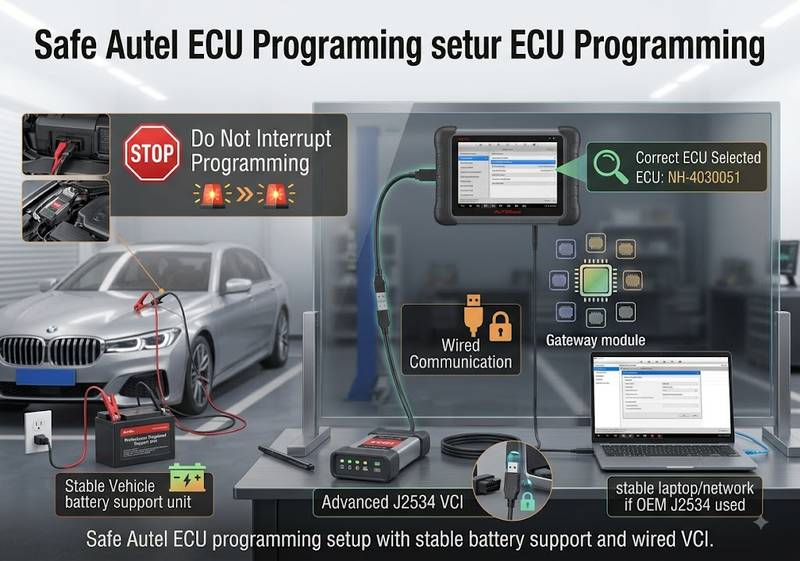
Stop an Autel coding or programming operation before starting if vehicle power is unstable, the exact ECU or vehicle has not been confirmed, the VCI repeatedly disconnects, or the required programming procedure cannot be verified. During an active write process, do not casually interrupt power or communication. Recovery procedures vary by ECU, vehicle, and software, and an incorrect recovery attempt can create a more serious failure.
Do not begin programming when:
- battery voltage is unstable;
- the battery-support requirement is unknown;
- VCI communication is intermittent;
- Wi-Fi/USB connection is unreliable;
- the vehicle identification is uncertain;
- the ECU part number is uncertain;
- the wrong software environment may be selected;
- required OEM authorization is unavailable;
- a previous flash has already failed, and the recovery procedure is unknown.
For safety-critical, high-voltage EV, airbag, ADAS, and immobilizer operations, use the relevant manufacturer procedure and trained personnel.
Which Autel Scanner Fits Your Workshop?
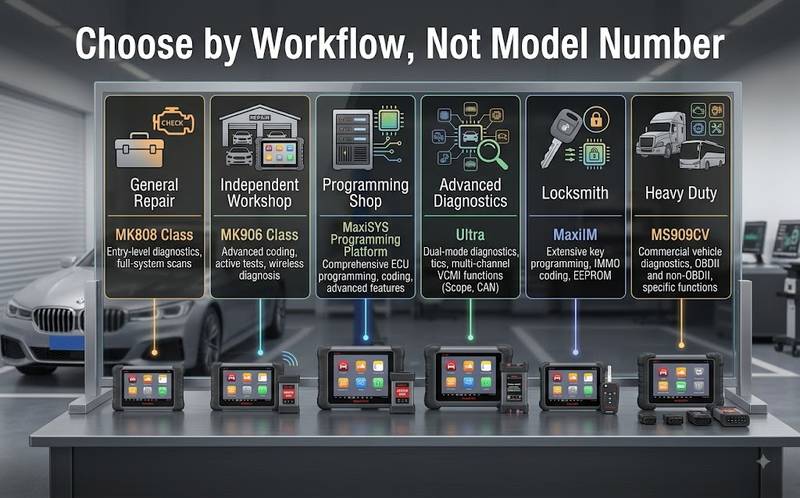
The most efficient way to select an Autel scanner is to match the platform to the highest-value work the shop performs regularly. A general workshop gains more from fast full-system scanning and active tests than from occasional programming capability it never uses. An advanced diagnostics shop, by contrast, may recover the cost of VCMI measurement and programming hardware through complex electrical and module work.
General Repair / Maintenance
Consider: MK808-class platform
Priorities:
- DTCs;
- live data;
- active tests;
- maintenance functions.
Independent Multi-Brand Workshop
Consider: MK906BT or newer 906-series equivalent.
Priorities:
- wireless VCI;
- full-system scans;
- active tests;
- supported coding;
- workshop mobility.
Advanced Coding / Module Replacement Workshop
Compare: current 908-series, MS909 or other programming-capable MaxiSYS platforms.
Verify:
- J2534;
- protocol coverage;
- coding/programming scope;
- OEM workflow.
Advanced Electrical / Diagnostic Specialist
Consider: MaxiSYS Ultra / current Ultra-class platform.
The VCMI measurement functions are the major differentiator, not simply a larger screen.
Heavy-Duty Fleet
Compare: Autel MS909CV and other dedicated CV solutions rather than assuming passenger-car MaxiCOM/MaxiSYS coverage.
Professional Automotive Locksmith
Compare: MaxiIM IM508/IM608-family solutions where advanced immobilizer/key functionality is required.
Where to Compare Autel Diagnostic Tools at OBD2.LTD
Once you know the required diagnostic level, compare the available Autel Diagnostic Tools by the specific work your shop performs rather than selecting the highest model number.
The OBD2.LTD Autel category currently includes diagnostic, programming, key-programming, measurement, and commercial-vehicle Autel products, including MaxiSYS Ultra, MS909-family, MaxiIM, and commercial-vehicle platforms.
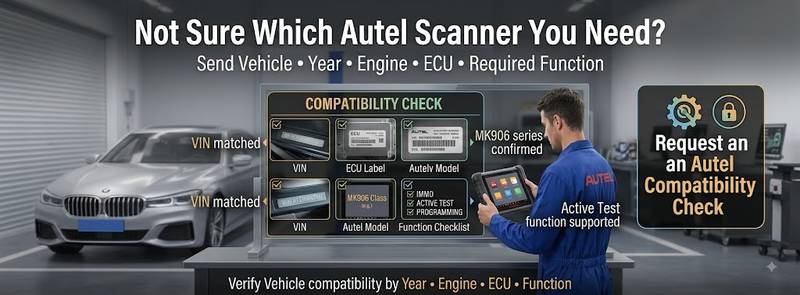
Before ordering, provide:
- vehicle make;
- model;
- year;
- engine;
- ECU or system;
- required diagnostic function;
- required coding/programming function;
- preferred scanner model.
A useful compatibility request is:
2020 BMW G30 530i. I need full-system diagnosis, bi-directional testing, and replacement-module coding. I am comparing MK906BT with a newer MaxiSYS platform. Please confirm the required Autel model and software coverage.
That is much more useful than asking:
Which Autel scanner supports BMW?
Frequently Asked Questions
Is the Autel MK808 a bi-directional scanner?
Autel’s official MK808 documentation lists active-test capability on supported vehicles. The exact actuator tests available depend on the vehicle, ECU, and software coverage.
Can the MK808 program an ECU?
MK808 should not be treated as a universal ECU-programming platform. If ECU reflashing or replacement-module programming is required, confirm the exact vehicle workflow and compare a programming-capable MaxiSYS/J2534 solution.
Is MK906BT better than MK808?
MK906BT is generally the more workshop-oriented platform when wireless VCI communication and supported ECU coding are required. MK808 can be more appropriate when the priority is compact full-system diagnostics, active tests, and service functions.
Is MK908P still a good Autel scanner?
MK908P can still be useful when an existing unit has suitable vehicle coverage, registration, and J2534 hardware. A new buyer should also compare current models because Autel’s 2026 catalog emphasizes newer 908-series and MaxiSYS platforms.
What is the main advantage of MaxiSYS Ultra?
The MaxiSYS Ultra combines advanced diagnostics with the MaxiFlash VCMI. Autel lists the VCMI as a vehicle communication and measurement device with oscilloscope, waveform generator, multimeter, and CAN-bus testing functions.
Can every Autel scanner perform ECU coding?
No. Coding capability varies by scanner, vehicle, module, and software coverage. A coding menu on one vehicle does not prove the same function exists on another.
Does J2534 mean the scanner can program every vehicle?
No. J2534 provides a standardized pass-through communication interface. The vehicle manufacturer may still require OEM software, a subscription, credentials, and vehicle-specific programming procedures.
Why does my Autel VCI connect to the tablet but not the vehicle?
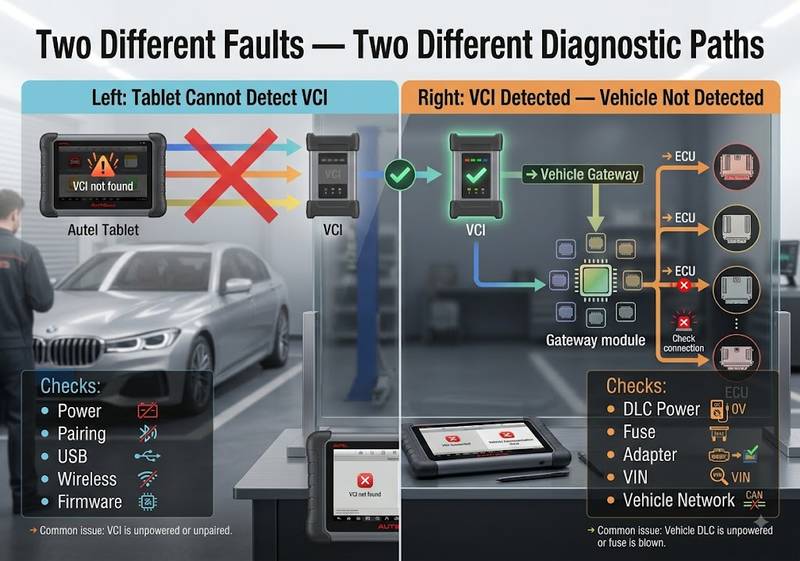
Tablet-to-VCI and VCI-to-vehicle communication are separate links. Autel lists causes such as loose connections, blown vehicle fuses, wiring faults, adapter problems, unsupported system selection, and incorrect vehicle identification.
Do Autel scanners stop working when the update subscription expires?
An expired update subscription should not automatically be interpreted as the scanner becoming unusable. However, access to the latest vehicle coverage, software changes, and new functionality depends on the relevant update/TCP status. Check the exact product’s subscription terms before purchasing.
Which Autel tool should a locksmith buy?
A professional locksmith who needs advanced key and immobilizer functions should compare Autel’s dedicated MaxiIM products rather than choosing a general diagnostic scanner solely because it lists an IMMO service function.
Final Autel Scanner Buying Checklist
Before ordering an Autel scanner, confirm:
Exact Autel model and generation
Vehicle make
Model
Model year
Engine
ECU or target system
Full-system diagnostic requirement
Live-data requirement
Active-test requirement
Service-function requirement
Coding requirement
Programming requirement
Calibration requirement
J2534 requirement
CAN FD / DoIP requirement where applicable
Security-gateway requirement
Required VCI
Required adapters
Software/update status
OEM software/account requirement
Battery-support requirement
ADAS hardware requirement
IMMO/key-programming requirement
Heavy-duty or passenger-car application
Conclusion
There is no single Autel scanner that is automatically the correct choice for every workshop.
MK808 is a strong starting point when the work centers on full-system diagnostics, service functions, and active tests. MK906BT is more appropriate when an independent workshop wants wireless VCI operation and supported coding capability. MK908P remains relevant as a legacy professional platform, but new buyers should compare it with current Autel generations. MaxiSYS Ultra is most valuable when advanced diagnostics, electrical measurement, network testing, and programming workflows are part of normal daily work.
The safest purchasing sequence is:
Vehicle → ECU/System → Required Function → Communication Interface → Autel Model
Before ordering, compare the current Autel Diagnostic Tools at OBD2.LTD and send the vehicle, year, engine, controller, and required function if compatibility is uncertain.
Buy the capability your workshop needs—not the longest specification sheet.