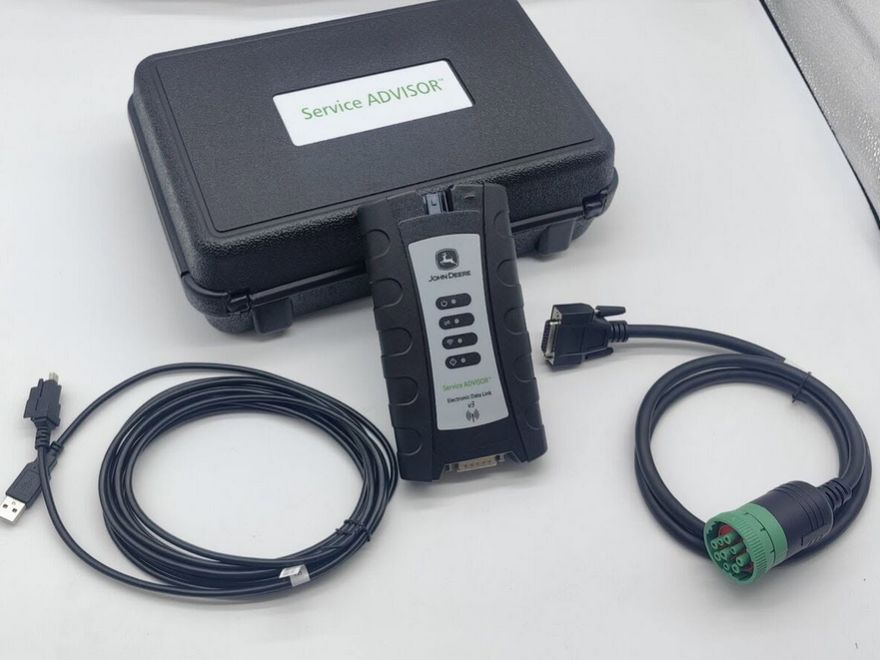
The John Deere 120C excavator can generally be diagnosed with John Deere Service ADVISOR and a compatible Electronic Data Link, provided the software includes the correct Construction & Forestry database and the interface kit matches the machine’s diagnostic connector.
Compatibility should not be confirmed from the model year alone. Before ordering a diagnostic package, verify the machine’s product identification number, engine serial number, diagnostic connector and required test functions.
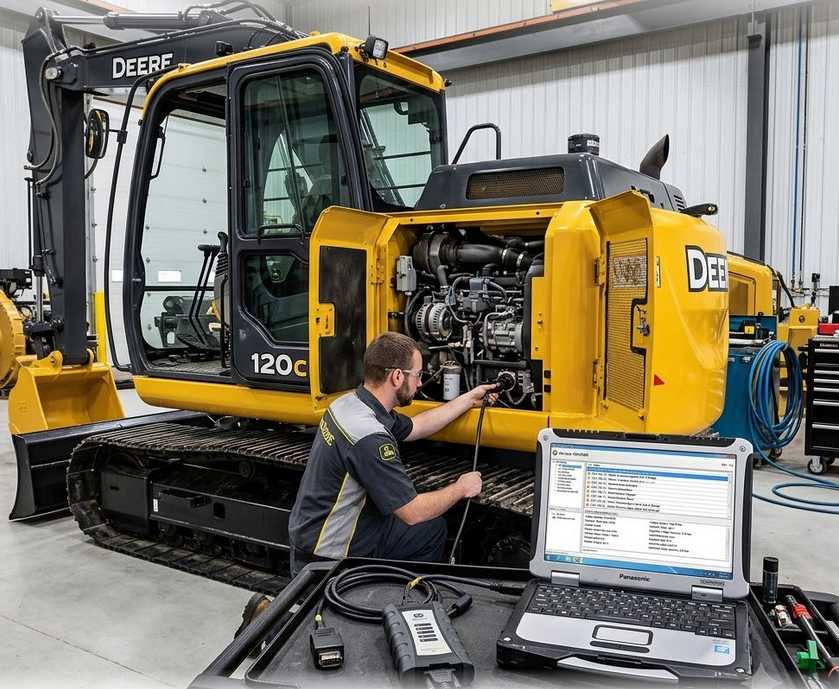
Is a 2004 John Deere 120C Compatible with Service ADVISOR?
In most cases, yes. The John Deere 120C is an electronically managed C-Series excavator equipped with a John Deere 4045H PowerTech engine and the Powerwize II engine/hydraulic management system. Deere’s original product literature also states that the machine includes a diagnostic display capable of showing fault codes and engine parameters such as fuel pressure, coolant temperature and manifold temperature.
This electronic control architecture makes the 120C suitable for computer-based diagnostics. However, successful communication depends on four factors:
- Correct John Deere Construction & Forestry software coverage
- A supported diagnostic interface
- The correct machine cable or adapter
- A functioning diagnostic network and power supply
A scanner connecting physically to the excavator does not guarantee that every controller, calibration or test will be available.
John Deere 120C Technical Overview
The original 120C specifications identify the machine as a 12-metric-ton-class excavator using a turbocharged, charge-air-cooled John Deere 4045H engine.
| Specification | John Deere 120C |
| Engine | John Deere 4045H PowerTech |
| Displacement | 4.5 L |
| Configuration | Four-cylinder, turbocharged and charge-air cooled |
| Rated power | 89 SAE net hp at 2,200 rpm |
| Electrical system | 24 V |
| Management system | Powerwize II engine/hydraulic management |
| Diagnostic capability | On-machine fault-code and operating-parameter display |
These details are useful when selecting software because the engine family, controller generation and machine serial-number range may affect the available diagnostic routines.
Required Hardware and Software
1. John Deere Service ADVISOR for Construction & Forestry
Use a Service ADVISOR installation or subscription that includes Construction & Forestry coverage. An Agriculture-only database may not contain the correct 120C excavator information.
John Deere describes Customer Service ADVISOR as a database of operator, diagnostic and technical manuals. With a compatible EDL, authorized users can connect to supported machines, clear and refresh codes, take diagnostic readings and perform limited calibrations.
Before installation, confirm that the software contains:
- John Deere 120C model coverage
- The correct machine serial-number range
- 4045H engine diagnostic information
- Electrical and hydraulic diagnostic manuals
- The required controller tests and calibrations
Do not rely only on a software version number. A newer version without the correct Construction & Forestry database may be less useful than an older installation containing the proper legacy-machine data.
2. Compatible Machine Interface
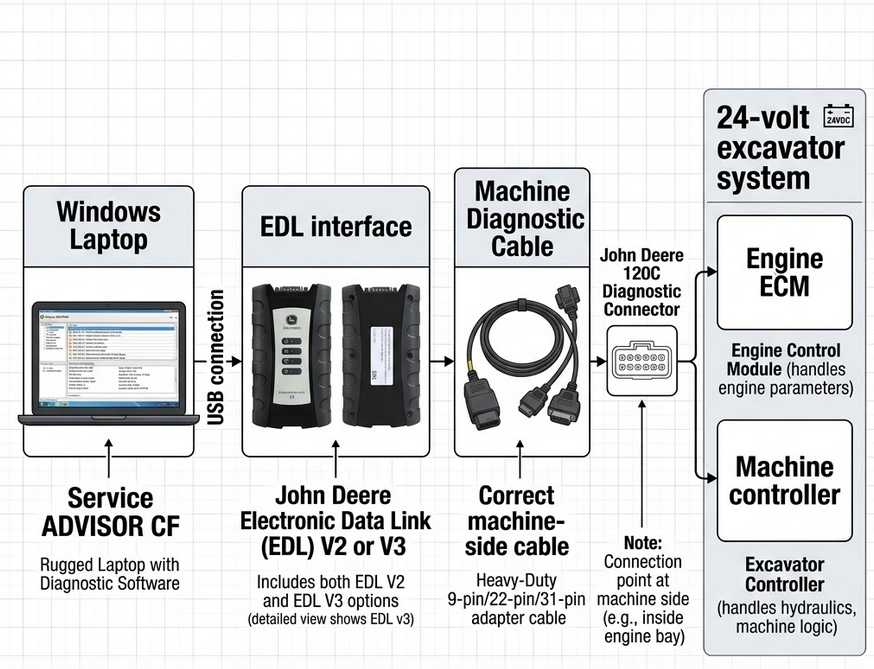
A diagnostic interface connects the Service ADVISOR laptop to the excavator’s electronic controllers.
Common options include:
- John Deere Electronic Data Link V2
- John Deere Electronic Data Link V3
- Other Deere-approved machine interface kits supported by the software
John Deere currently lists a V3 Bluetooth Machine Interface Kit that connects a diagnostic computer directly to supported machines and includes the interface, connector cable, USB cable and storage case.
EDL V3 is a practical option for workshops servicing both older and newer Deere equipment, but EDL V2 may also work with legacy machines when the correct drivers, cable and software are installed.
3. Correct Diagnostic Cable
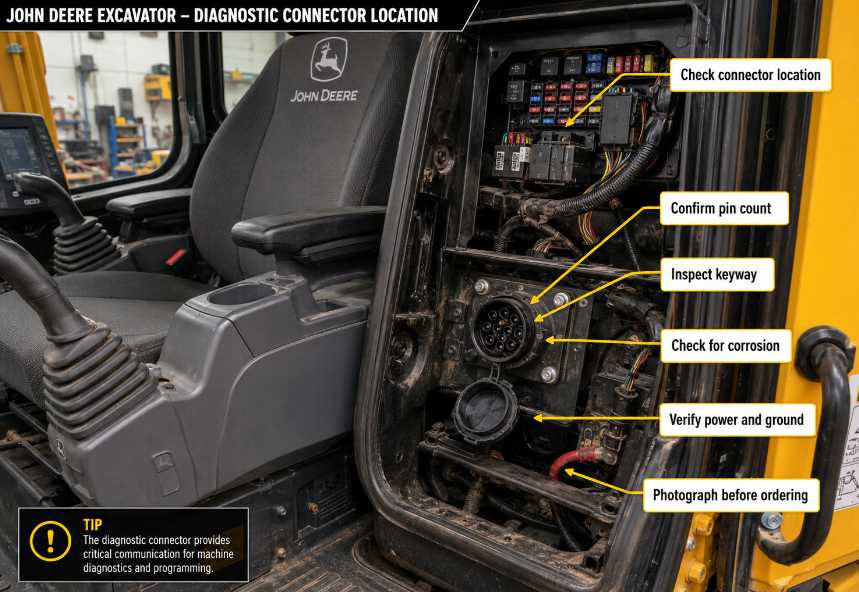
The interface must be paired with the correct machine-side cable. Do not assume that every 120C uses the same connector solely from its production year.
Before ordering, inspect the machine and provide the supplier with:
- Full machine model
- Product identification number
- Engine serial number
- A clear photograph of the diagnostic connector
- Connector pin count
- Required diagnostic function
The connector may be located inside or around the operator station, but its exact position and cable requirements should be verified using the machine’s operator or technical manual.
4. Compatible Windows Laptop
The laptop should have:
- A supported Windows operating system
- Correct EDL drivers
- Stable USB ports
- Sufficient storage for the CF database
- A reliable power supply
- Sleep and automatic shutdown disabled during testing
Use a direct USB connection during initial setup. Bluetooth may be convenient for general diagnostics, but a wired connection is normally preferable when stable communication is critical.
What Can Service ADVISOR Do on a John Deere 120C?
Available functions depend on the machine serial number, installed controllers, software database and user access level.
Read and Clear Diagnostic Trouble Codes
Service ADVISOR can identify active and stored controller faults on supported systems. Depending on the machine configuration, these may include faults related to:
- Engine sensors
- Fuel delivery
- Engine speed control
- Hydraulic pump control
- Pump displacement sensors
- Electrical supply voltage
- CAN or controller communication
- Operator controls
- Solenoids and actuators
Always record the original codes and machine symptoms before clearing anything.
View Live Data
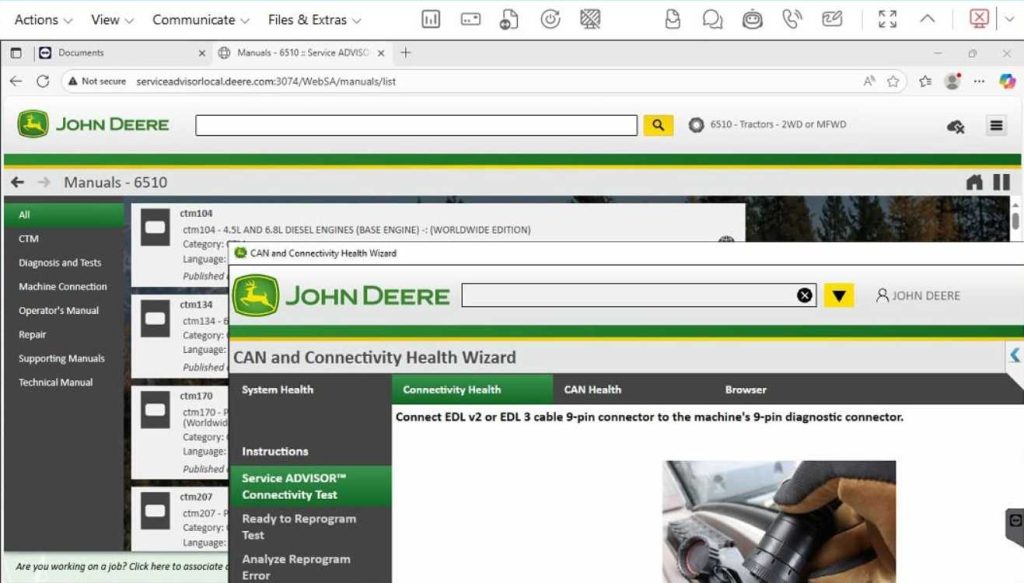
Live readings help identify intermittent faults that may not remain active long enough to create a permanent code.
Potentially useful values include:
- Engine speed
- Coolant temperature
- Battery and charging voltage
- Fuel-related sensor data
- Pump-control values
- Switch and operator-control status
- Solenoid commands
- Controller supply voltage
- Communication status
The original Deere brochure confirms that the 120C’s diagnostic system can display fault codes and engine operating information, although the exact parameters visible through Service ADVISOR will depend on controller support.
Perform Supported Tests and Calibrations
Depending on software access and machine configuration, Service ADVISOR may provide selected tests or calibrations.
Possible procedures can include:
- Sensor checks
- Solenoid or output tests
- Engine-speed verification
- Pump-control checks
- Controller input monitoring
- Selected calibration routines
- Diagnostic network tests
Do not promise cylinder cutout tests, hydraulic relief-valve tests or controller programming without checking the exact 120C coverage page. John Deere’s customer diagnostic products officially provide limited calibrations, which may not include every dealer-level procedure.
Access Technical Manuals
One of the most valuable Service ADVISOR features is access to Deere service information.
Depending on the subscription or installed database, technicians may be able to view:
- Diagnostic procedures
- Electrical schematics
- Connector pinouts
- Component locations
- Controller descriptions
- Test specifications
- Disassembly and repair instructions
- Hydraulic system information
This allows a technician to move from a fault code to the appropriate test procedure instead of replacing parts based only on the code description.
Recommended Diagnostic Workflow
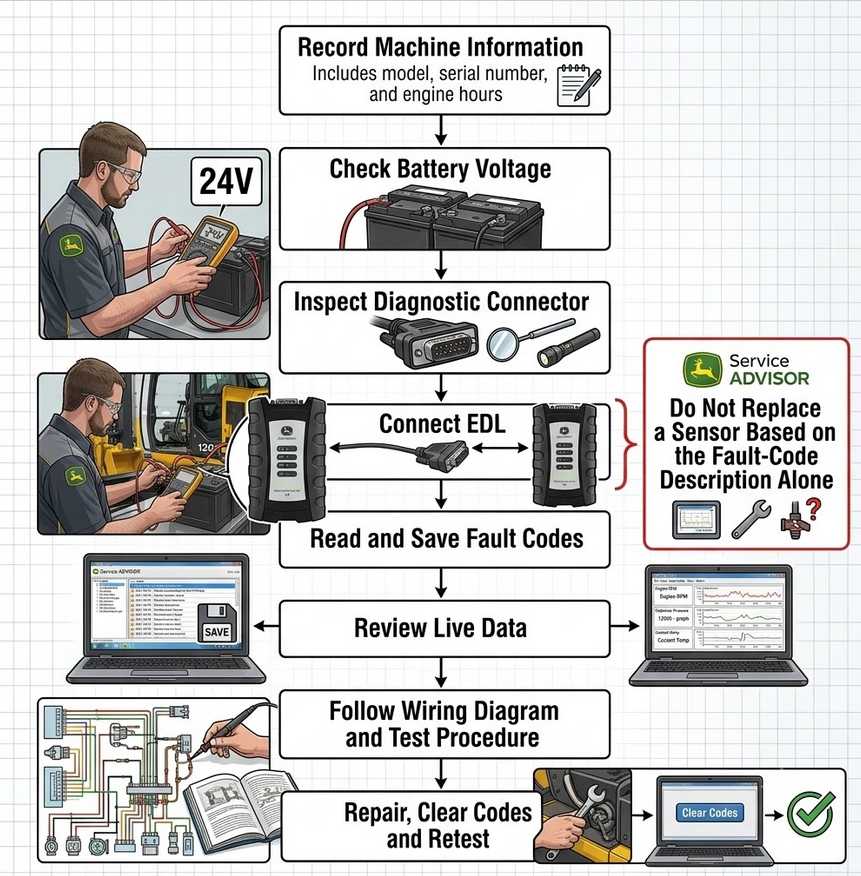
Step 1: Record the Machine Information
Before connecting the laptop, record:
- Model: John Deere 120C
- Product identification number
- Engine model and serial number
- Hour-meter reading
- Customer complaint
- Active warning lights
- Conditions under which the fault occurs
Serial-number information is especially important on an older machine because component and wiring changes may exist within the same model family.
Step 2: Check Battery Voltage
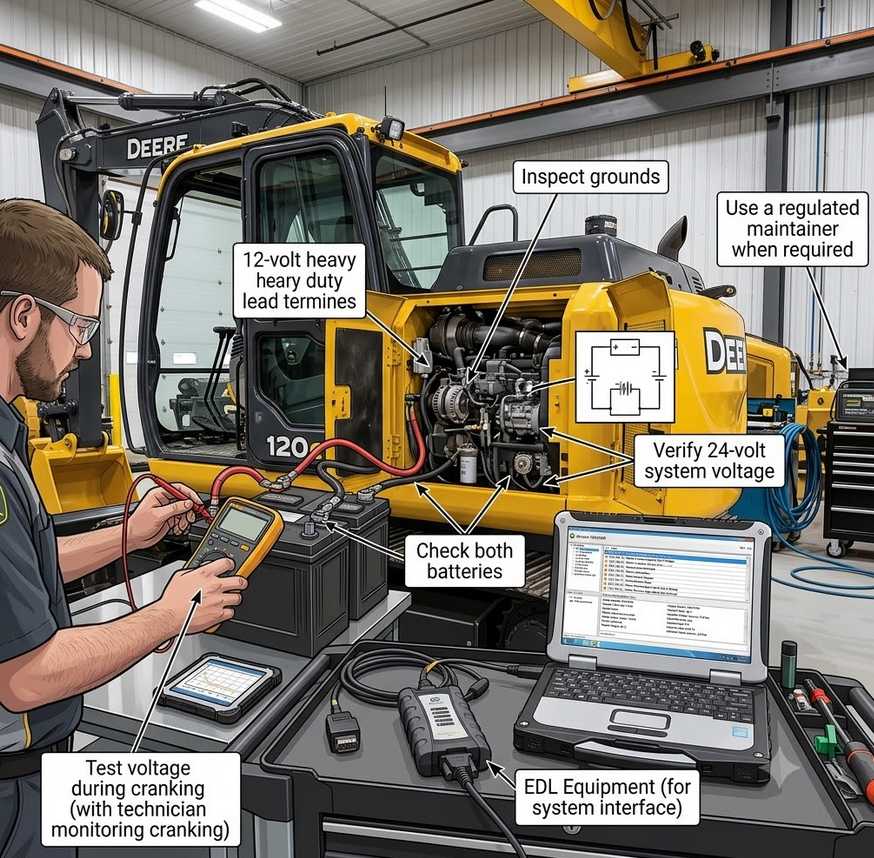
The 120C uses a 24-volt electrical system. Deere’s specifications show two 12-volt batteries and a 45-amp alternator.
Before diagnosis:
- Inspect both batteries
- Check cable and ground connections.
- Verify key-off and key-on voltage.
- Confirm the voltage does not collapse during cranking.
- Use an appropriate regulated maintainer when necessary.
Low voltage can cause communication failures, false controller codes and unstable live data.
Step 3: Inspect the Diagnostic Connector
Check for:
- Bent or spread terminals
- Corrosion
- Moisture
- Damaged seals
- Loose wiring
- Missing power or ground
- Previous repair damage
Do not force an adapter into a connector that appears similar but has a different keyway or pin arrangement.
Step 4: Connect the EDL
Use this general connection order:
Laptop → EDL Interface → Correct Machine Cable → John Deere 120C Diagnostic Connector
Then:
- Connect the interface to the laptop.
- Confirm that Windows recognizes the interface.
- Attach the correct cable to the EDL.
- Connect the machine-side plug.
- Turn the key to the required position.
- Open the Construction & Forestry software.
- Select or identify the machine.
- Confirm communication with the available controllers.
Step 5: Save the Initial Diagnostic Report
Before clearing codes, save:
- Active fault codes
- Stored fault codes
- Controller identification
- Software versions
- Relevant live-data readings
- Freeze-frame or occurrence information when available
This provides a baseline and helps confirm whether the repair corrected the original problem.
Step 6: Follow the Manual-Based Test Procedure
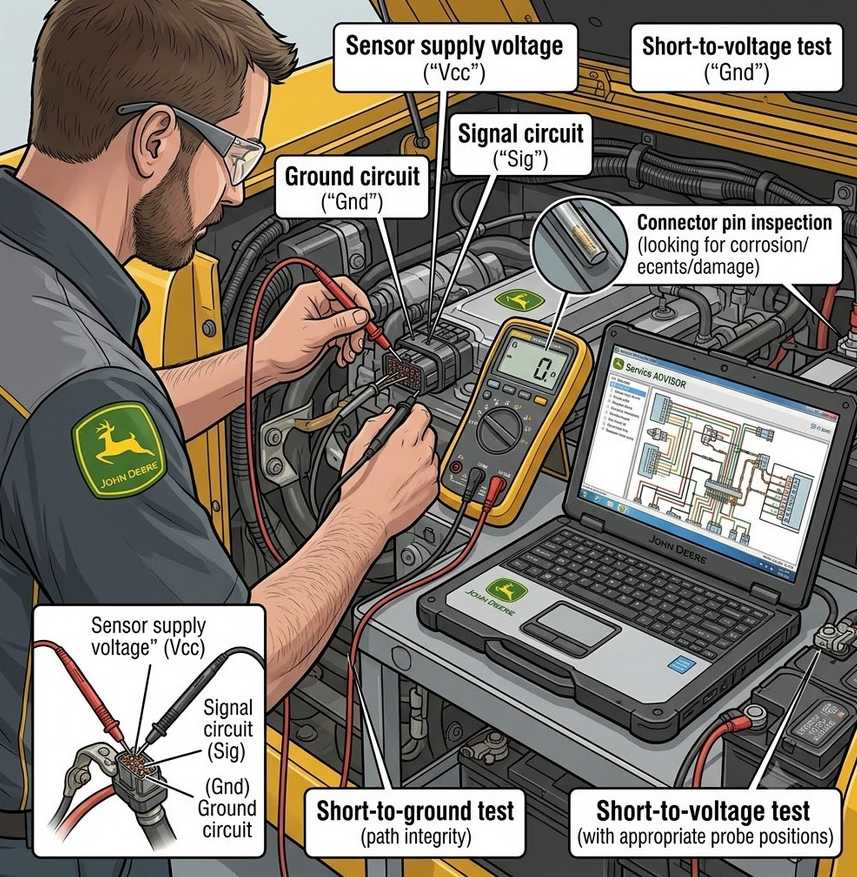
A fault code identifies the circuit or condition detected by a controller. It does not automatically prove that the named sensor has failed.
For example, a sensor-related code may be caused by:
- Open wiring
- Short to voltage
- Short to ground
- Poor connector contact
- Incorrect supply voltage
- Sensor failure
- Controller failure
Use the wiring diagram, pinout and test specifications in the appropriate technical manual before replacing components.
Step 7: Clear Codes and Retest
After completing the repair:
- Clear the applicable codes.
- Cycle the ignition as instructed.
- Start the machine.
- Allow it to reach operating temperature.
- Repeat the operating condition that produced the complaint.
- Monitor live data under load.
- Rescan all accessible controllers.
A code that does not return at idle may still return when the hydraulic system is loaded.
Common Connection Problems
Service ADVISOR Does Not Detect the EDL
Check:
- EDL driver installation
- USB cable condition
- Windows Device Manager
- Selected communication interface
- Interface firmware compatibility
- USB power-management settings
- Antivirus or security software interference
Try a direct laptop USB port rather than an unpowered hub.
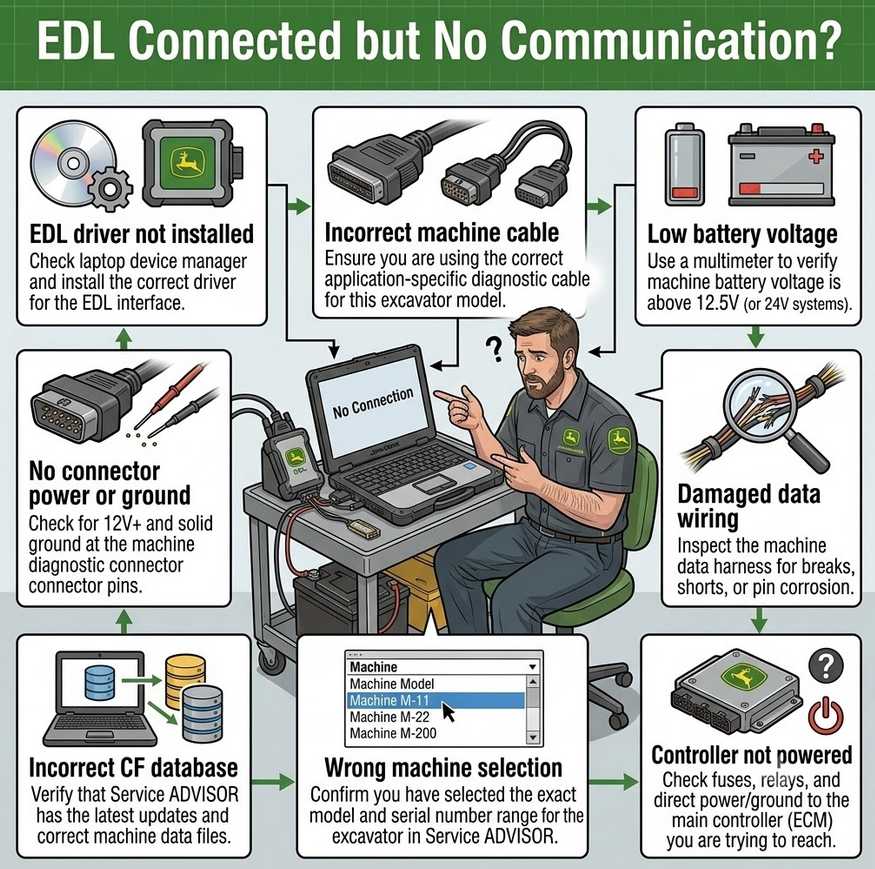
EDL Is Detected, but the Excavator Will Not Communicate
Possible causes include:
- Incorrect machine cable
- No power at the diagnostic connector
- Poor connector ground
- Low machine voltage
- Damaged data wiring
- Incorrect software database
- Wrong model or serial-number selection
- Controller not powered
- Network communication fault
Confirm connector power and ground before assuming the EDL is defective.
Some Controllers Are Missing
The 120C is an older machine and may not contain the same number of separately addressable controllers as a modern excavator. Some systems may also provide limited data through the monitor or engine controller rather than appearing as independent modules.
Missing controllers can also result from:
- Incorrect model selection
- Unsupported serial-number range
- Incomplete software installation
- Network wiring faults
- Controller power-supply problems
A Test or Calibration Is Not Available
The procedure may be:
- Unsupported on that controller
- Restricted by the user’s access level
- Available only in another manual section
- Dependent on a specific software database
- Unavailable on that serial-number range
- A dealer-level rather than customer-level function
Verify function coverage before purchasing the diagnostic kit.
Can Service ADVISOR Diagnose Hydraulic Problems?
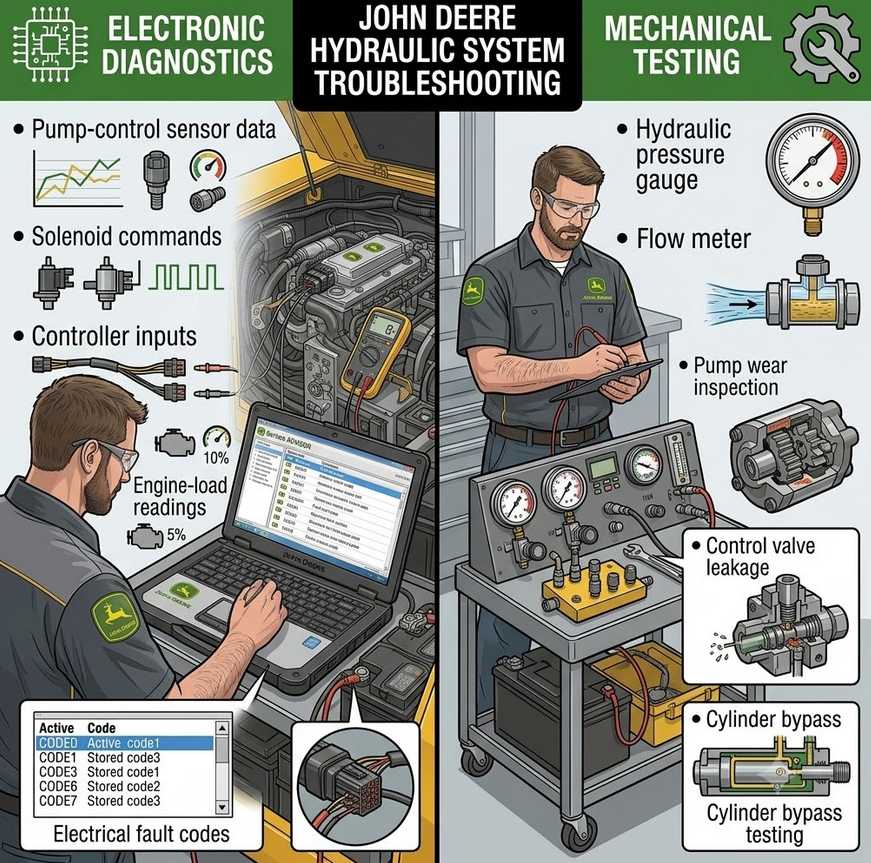
Service ADVISOR can assist with electronically monitored hydraulic faults, but it does not replace mechanical pressure and flow testing.
It may help identify:
- Pump-control sensor faults
- Solenoid command problems
- Controller input faults
- Engine-load issues
- Electrical problems affecting hydraulic performance
- Abnormal operating data
Mechanical issues such as internal pump wear, valve leakage, cylinder bypass or restricted hydraulic flow may still require pressure gauges, flow meters and manual inspection.
Is EDL V3 Better Than EDL V2 for the 120C?
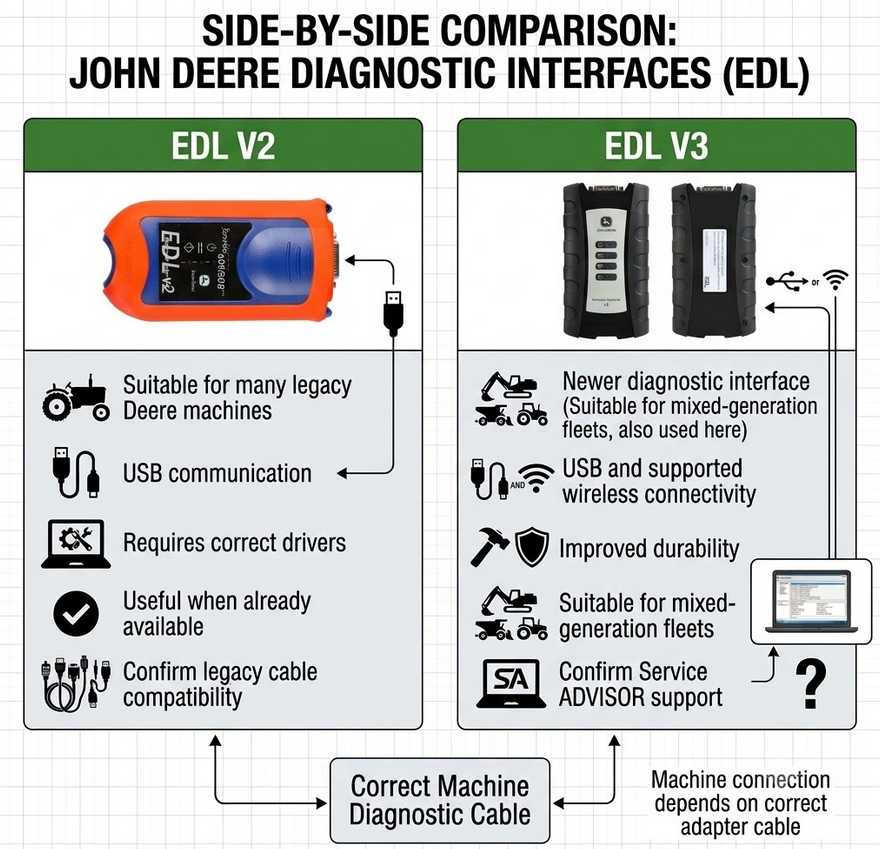
Both interfaces may be suitable when correctly configured.
Choose EDL V2 when:
- It is already available in the workshop.
- The required legacy cable is included.
- The installed software recognizes it.
- The workshop mainly services older Deere equipment.
Choose EDL V3 when:
- You service multiple generations of Deere machines.
- You want a newer interface and cable kit.
- You need USB and supported wireless connectivity.
- Your diagnostic software explicitly supports the interface.
For a single 2004 excavator, the newest interface is not automatically the best purchase. Correct software coverage and the right cable are more important than the interface generation.
How Independent Diagnostics Can Reduce Downtime
For an older excavator, diagnostic access can help distinguish an electrical or control-system fault from a mechanical failure.
The main benefits include:
- Faster fault-code identification
- Access to wiring and repair information
- Live-data monitoring
- Reduced unnecessary parts replacement
- Verification after repairs
- Less dependence on trial-and-error troubleshooting
- Better maintenance records
However, Service ADVISOR should be treated as part of the diagnostic process rather than a replacement for technical experience, electrical testing or hydraulic measurements.
Compatibility Checklist Before Ordering
Confirm the following with the diagnostic-tool supplier:
- John Deere 120C model support
- Exact product identification number range
- Construction & Forestry database included
- 4045H engine coverage
- EDL V2 or EDL V3 compatibility
- Correct machine-side cable
- Supported Windows system
- Required diagnostic functions
- Installation and driver support
- Software license or subscription terms
Ask for written confirmation based on the machine identification number rather than a general statement that the kit supports “John Deere excavators.”
EDL V2 or EDL V3: Which One Should You Buy?
| Requirement | EDL V2 | EDL V3 |
|---|---|---|
| Older John Deere equipment | Recommended | Recommended |
| Mixed-generation fleet | Limited by setup | Better choice |
| Wired USB diagnostics | Yes | Yes |
| Supported wireless connection | No or limited | Available on supported setups |
| Existing legacy installation | Good choice | May require updated setup |
| Professional multi-machine workshop | Suitable | Recommended |
| John Deere 120C compatibility | Verify cable and database | Verify cable and database |
For a single 2004 John Deere 120C, EDL V2 may be sufficient when the correct software and cable are already available. For a workshop servicing several Deere machine generations, EDL V3 is usually the more flexible long-term option.
Compatibility reminder: The interface alone does not determine coverage. Confirm the machine model, product identification number, engine serial number, diagnostic connector, Service ADVISOR CF database, and required function before purchasing.
Frequently Asked Questions
Does John Deere Service ADVISOR support the 2004 120C?
The 120C has electronic engine and hydraulic management suitable for computer-based diagnosis. Support still depends on the Construction & Forestry database, machine serial number, interface and cable.
Does the 120C use a 9-pin diagnostic connector?
Some diagnostic kits for Deere construction equipment include round multi-pin connectors, but the actual connector should be checked on the machine before ordering. Connector type and location should not be assumed solely from the model year.
Can EDL V3 clear John Deere 120C fault codes?
A compatible EDL and authorized Service ADVISOR setup can clear and refresh supported codes. Codes caused by an active electrical, mechanical or communication problem will return until the fault is repaired.
Can Service ADVISOR calibrate the hydraulic pumps?
Selected readings, tests or calibrations may be available, but coverage varies by serial number, controller and software access level. Verify the exact pump test or calibration before purchasing.
Does Service ADVISOR include wiring diagrams?
Customer Service ADVISOR provides access to John Deere operator, diagnostic and technical manuals, which can include electrical and repair information for licensed machines.
Is dealer access required?
John Deere offers customer-facing diagnostic and technical-information products, but some advanced programming, calibration or dealer-specific functions may remain restricted. Use properly licensed software and confirm the access level required for the intended repair.
Final Recommendation
A properly configured John Deere Service ADVISOR Construction & Forestry setup with EDL V2 or EDL V3 can be a valuable diagnostic solution for a John Deere 120C excavator.
The most important purchasing decision is not simply choosing EDL V3. It is confirming that the package includes:
Correct CF database + 120C serial-number coverage + compatible interface + correct machine cable + required diagnostic functions
With those items confirmed, technicians can use fault codes, live data, service manuals and supported tests to diagnose problems more accurately and reduce unnecessary downtime.