Quick Answer
The right OBD2 scanner is the least complicated tool that can reliably access the vehicles, control modules, and functions your work actually requires. A basic scanner may be enough for emissions-related fault codes and live data. At the same time, professional workshops may need full-system diagnostics, bi-directional tests, coding, DoIP, CAN FD, SAE J2534 programming, or dedicated heavy-duty software. Always verify exact coverage before buying.
CARB describes OBD II primarily as the vehicle’s self-diagnostic system for monitoring components that can affect emissions performance, so the presence of an OBD connector does not guarantee access to ABS, airbag, body, immobilizer or other manufacturer-specific systems.
Key Takeaways
- OBD2 compatibility does not mean full-system compatibility.
- Choose a scanner by the vehicle, controller and required function, not by the number of advertised functions.
- Reading a DTC is different from performing an active test, coding a control module or programming ECU software.
- Newer vehicles may require CAN FD or Diagnostic over Internet Protocol (DoIP) support.
ECU reprogramming may require an SAE J2534 pass-thru interface, compatible OEM software, and separate authorization.
Heavy-duty trucks commonly require a different communication and software ecosystem from passenger-car OBD2 tools; SAE J1939 defines important heavy-duty diagnostic services.
- A computer detecting the VCI does not prove the VCI can communicate with the vehicle.
- Always confirm the vehicle year, engine, ECU, interface, software version, and target function before ordering.
What Is an OBD2 Scanner—and What Can It Actually Diagnose?
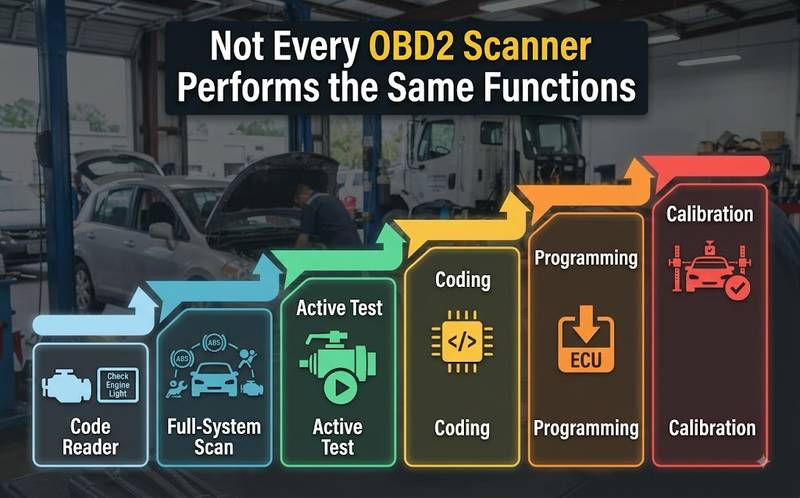
An OBD2 scanner is external test equipment that communicates with a vehicle’s On-Board Diagnostics system through the diagnostic connector. Generic OBD2 functions are mainly designed around legislated emissions-related data. Access to ABS, SRS, transmission, body control, immobilizer, active tests, coding, or programming requires additional manufacturer-specific capability that varies by tool and vehicle.
CARB explains that OBD II monitors components and systems that can affect emissions performance and stores information about detected malfunctions for repair technicians.
ISO 15765-4 defines CAN-based communication requirements between compliant vehicle OBD systems and external diagnostic equipment.
This distinction matters because three scanners can all say “OBD2 compatible” while having completely different workshop capabilities.
| Generic OBD2 code reader | Emissions DTCs, readiness, basic data | Check-engine-light diagnosis |
| Enhanced scanner | Multiple systems, manufacturer-specific data | General repair |
| Full-system professional scanner | ECU scan, live data, service functions | Independent workshop |
| Bi-directional scan tool | Commands actuators and modules | Component-level diagnosis |
| Programming interface | ECU software programming through compatible OEM software | Module replacement / reflash |
| Heavy-duty interface | Commercial-vehicle network and OEM software communication | Truck and fleet repair |
The exact functions still need to be verified for the specific vehicle and software version.
Who This Guide Is For—and When an OBD2 Scanner Is Not Enough
An OBD2 buying decision depends heavily on the work environment. A general repair shop needs broad full-system coverage; a Porsche or Mercedes specialist may value OEM software compatibility; a fleet shop may require SAE J1939; an ECU specialist needs programming interfaces; and an automotive locksmith may require immobilizer-specific authorization and hardware beyond normal OBD diagnostics.
Passenger-Car Repair Shops
Prioritize:
- Full-system auto scan
- Live data
- Bi-directional control
- Service functions
- Coding where required
- CAN FD / DoIP on newer platforms
- Printable or exportable diagnostic reports
Brand Specialists
Prioritize:
- OEM-level software compatibility
- Correct VCI
- Exact ECU coverage
- Coding and adaptation capability
- Online/offline requirements
Fleet and Heavy-Duty Workshops
A passenger-car scanner should not automatically be assumed suitable for commercial trucks. SAE J1939-73 defines diagnostic messages and service-tool communication used in J1939 networks, while SAE J1939-13 specifies diagnostic connectors used to access J1939 communication links.
Fleet users should confirm:
- J1939 support
- Required heavy-duty connector
- Engine/vehicle manufacturer coverage
- OEM application compatibility
- PC driver or API requirements
- Aftertreatment and service functions
Construction and Agricultural Equipment
Machines may use the same engine families found in trucks but require manufacturer-specific:
- Communication adapters
- Service software
- Cables
- Licenses
- Controller databases
A generic truck scanner may read an engine fault while failing to access the machine controller, hydraulic controller, or implement system.
ECU Programmers
If the job involves ECU reading, writing, or recovery, an OBD2 scanner alone is usually not the correct tool. Programming may involve OBD, bench, boot, JTAG or BDM workflows depending on the controller.
Automotive Locksmiths
A full-system diagnostic scanner may identify immobilizer faults, but key learning, security-data operations and immobilizer programming can require dedicated authorized locksmith equipment. Coverage must be checked by vehicle, year, immobilizer generation and intended operation.
Six Diagnostic Functions Buyers Commonly Confuse
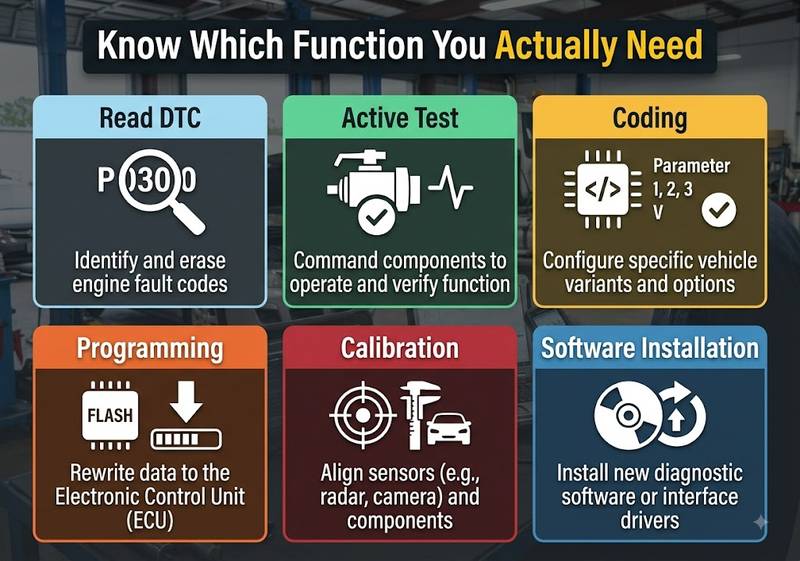
The terms “diagnostics,” “coding” and “programming” are frequently used interchangeably in product listings, but they represent different operations and risk levels. A scanner that reads every control module may still be unable to command components, code a replacement module, or install firmware. Buyers should define the exact required operation before comparing devices.
|
Read/Clear DTCs
|
Retrieve and erase Diagnostic Trouble Codes | Read P0301 |
|
Active Test / Bi-Directional Control
|
Command a component through the ECU | Activate cooling fan |
|
Coding / Configuration
|
Change module configuration or equipment settings | Configure replacement module |
|
Programming / Reflashing
|
Write software or calibration to ECU memory | Install OEM ECU software |
|
Calibration / Relearn
|
Teach or recalibrate a sensor/system | Steering-angle calibration |
|
Software Installation
|
Install diagnostic software and drivers on the PC | Install VCI driver |
Reading Codes Is Not a Diagnosis
A DTC tells the technician what condition the ECU detected, not necessarily which component must be replaced.
For example, a circuit fault can result from:
- sensor failure;
- broken wire;
- poor connector contact;
- missing supply voltage;
- bad ground;
- controller issue.
The scanner should be used to direct testing, not replace testing.
Active Testing Is Different from Reading Live Data
Live data observes what a controller is reporting.
An active test sends a command, such as:
- activate a relay;
- run a fan;
- command a valve;
- cycle a solenoid.
Availability varies by vehicle and controller.
Coding Is Not Programming
Coding usually changes configuration data.
Programming normally writes firmware or calibration data into the controller.
SAE J2534 describes a standardized PC-to-vehicle pass-thru interface for vehicle programming. Still, an interface conforming to J2534 does not by itself provide the required OEM application, subscription, or vehicle-specific authorization.
Choose the Diagnostic Tool by the Job, Not the Product Name
The most reliable buying method is to begin with the jobs the workshop performs every week and work backward to the required hardware. Do not start with a product page containing hundreds of feature icons. Build a requirement list covering vehicles, modules, functions, protocols, and software, then eliminate any scanner whose compatibility cannot be confirmed.
If You Mainly Diagnose Check Engine Lights
Look for:
- Generic OBD2 DTCs
- Freeze-frame information
- Readiness monitor status
- Live powertrain data
A basic reader may be sufficient.
If You Operate a General Repair Shop
Look for:
- Full-system scanning
- Engine
- Transmission
- ABS
- SRS
- Body
- HVAC where supported
- Live-data graphing
- Active tests
- Common service procedures
If You Replace Electronic Modules
Confirm whether the tool supports the exact operation:
replacement → identification → coding → adaptation → calibration → programming
These are not automatically included together.
If You Program ECUs
Check:
- J2534 requirement
- OEM VCI requirement
- PC operating system
- OEM application version
- battery-support requirements
- subscription/login requirements
- CAN FD or DoIP requirements
If You Service Trucks
Start with:
- engine/vehicle brand;
- model year;
- diagnostic connector;
- J1939 requirement;
- OEM diagnostic software;
- required functions.
Do not assume that a passenger-car OBD2 adapter will perform heavy-duty diagnosis.
Car Diagnostic Tools vs Truck Diagnostic Tools
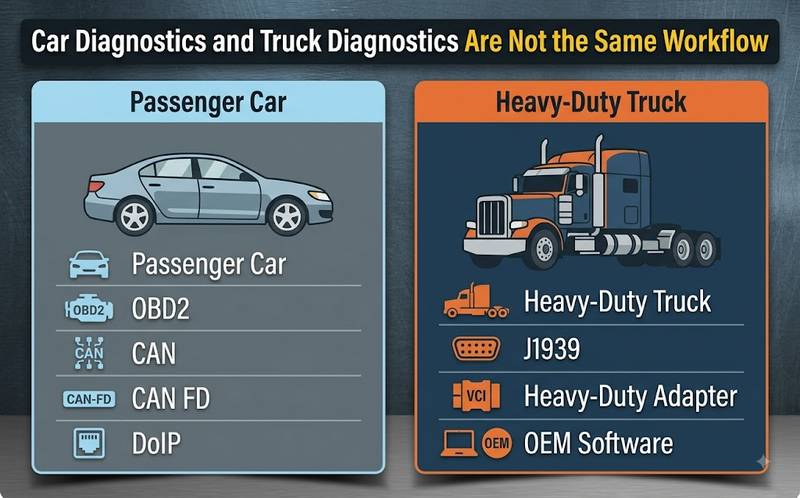
Passenger-car and heavy-duty diagnostic systems overlap in some areas but should be treated as separate purchasing categories. Passenger cars commonly use the standardized OBD connector and CAN-based diagnostics. At the same time, commercial vehicles may rely heavily on SAE J1939, dedicated heavy-duty connectors, PC-based OEM applications, and manufacturer-specific interfaces. Tool compatibility must therefore be checked by vehicle class, not just connector appearance.
SAE J1939-73 defines J1939 diagnostic messages, while U.S. EPA rules require OBD systems on applicable modern heavy-duty highway engines.
| Generic emissions codes | Common | May be available |
| Full vehicle diagnosis | Enhanced/OEM tool | Heavy-duty/OEM tool |
| CAN | Common | Common in applicable platforms |
| J1939 | Usually not primary | Important |
| OEM PC software | Sometimes | Very common professionally |
| Specialized adapters | Sometimes | Common |
| Aftertreatment service | Vehicle-specific | Major workshop requirement |
| Engine + chassis coverage | Scanner dependent | Often separate systems |
If your workshop services both, confirm that the product genuinely supports both ecosystems rather than assuming a “2-in-1” claim means identical functionality.
Which Communication Protocols Matter
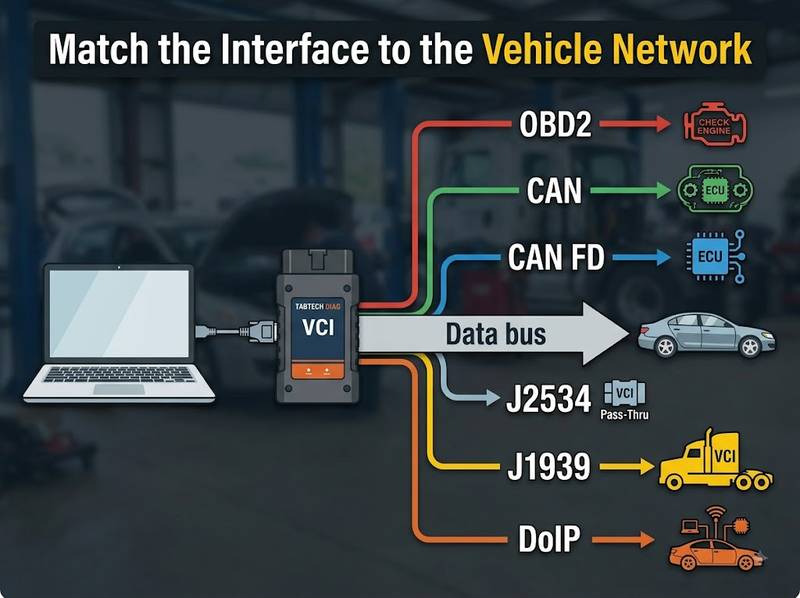
When Buying an OBD2 Scanner?
Protocol support matters because the scanner must communicate through the same physical and diagnostic network used by the target vehicle. Traditional OBD compatibility remains useful, but modern workshops should also check CAN FD, DoIP, J2534 and heavy-duty J1939 when applicable. The exact protocol requirement depends on vehicle platform, model year, ECU and desired diagnostic function.
CAN / DoCAN
ISO 15765-4 defines OBD communication over Controller Area Network (CAN) between compliant vehicle systems and external diagnostic equipment.
CAN FD
CAN with Flexible Data Rate is increasingly relevant to newer platforms. SAE’s J2534 extended features include support specifications for CAN FD.
A scanner that supports conventional CAN should not automatically be assumed to support CAN FD.
DoIP
DoIP means Diagnostic communication over Internet Protocol.
ISO 13400 defines IP-based diagnostic communication between test equipment and vehicle diagnostic entities, including vehicle discovery and gateway communication.
This can matter on newer vehicle platforms where Ethernet-based diagnostic communication is required.
SAE J2534
SAE J2534 defines a standardized pass-through interface between a PC and vehicle for programming-related applications.
Always separate these questions:
Does the VCI support J2534?
from:
Does the OEM application support this VCI for this vehicle and operation?
They are not the same question.
SAE J1939
SAE J1939 is particularly important for commercial-vehicle networks. J1939-73 defines diagnostic services and messages used by service tools.
Tools and Preparation Before Connecting a Diagnostic Scanner
A reliable diagnostic session depends on more than the scanner. Before diagnosing a communication problem, make sure the vehicle, diagnostic connector, laptop, interface, cables, and software environment are stable. If the preparation stage is ignored, technicians can waste time replacing drivers or interfaces when the real cause is a blown DLC fuse, low battery voltage, or incorrect adapter.
Recommended preparation includes:
- correct diagnostic interface;
- correct DLC or heavy-duty adapter;
- stable vehicle battery;
- regulated battery support for programming;
- suitable Windows laptop where required;
- correct VCI driver;
- compatible diagnostic software;
- known-good USB or Ethernet cable;
- internet access if the application requires online services;
- vehicle wiring information when communication diagnosis is required.
For control-unit programming, follow the vehicle or OEM software’s specified battery-support requirements rather than relying on an uncontrolled charger.
OBD2 Scanner Will Not Communicate: What Should You Check First?
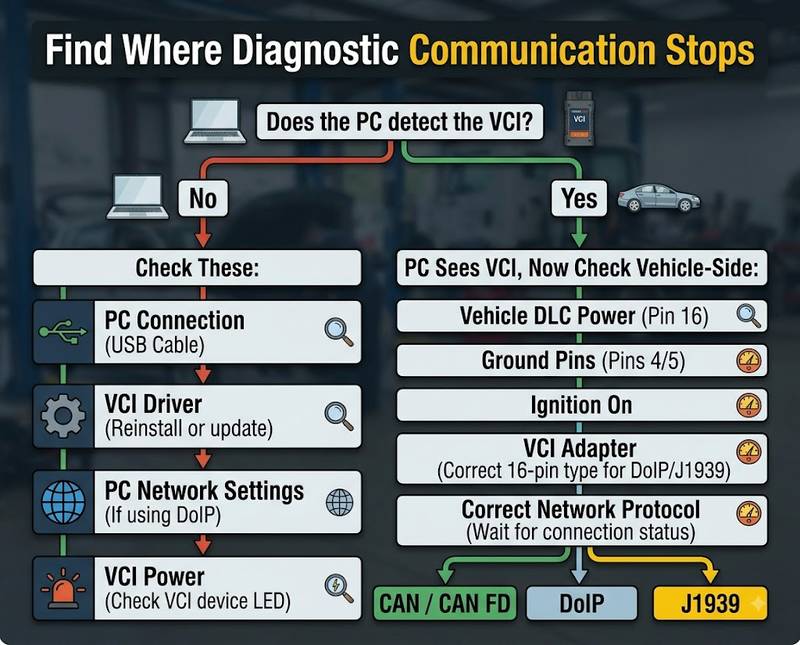
When a scanner cannot communicate, begin with low-cost, easily verified causes before suspecting a failed ECU. First determine whether the problem is between the computer and diagnostic interface or between the interface and vehicle. Then check power, ignition status, DLC supply and ground, cables, drivers, adapters, network settings, and vehicle communication according to the wiring information.
The following order is a practical check-cost priority, not a statistical failure probability.
| 1 | Wrong vehicle/function selected | Confirm VIN, year, engine and ECU |
| 2 | Ignition or battery condition | Confirm required ignition state |
| 3 | DLC power/fuse problem | Verify connector supply and related fuse |
| 4 | DLC ground problem | Check ground circuits |
| 5 | Cable/adapter problem | Inspect and substitute known-good cable |
| 6 | PC driver/USB/network issue | Check Device Manager and network adapters |
| 7 | Incorrect VCI/software combination | Verify driver, firmware and software version |
| 8 | Vehicle network fault | Diagnose CAN/gateway using wiring information |
| 9 | Unsupported protocol/function | Confirm compatibility documentation |
| 10 | Authorization/online requirement | Confirm software account or required access |
“Tool Not Detected by Computer” vs “Tool Cannot Connect to Vehicle”
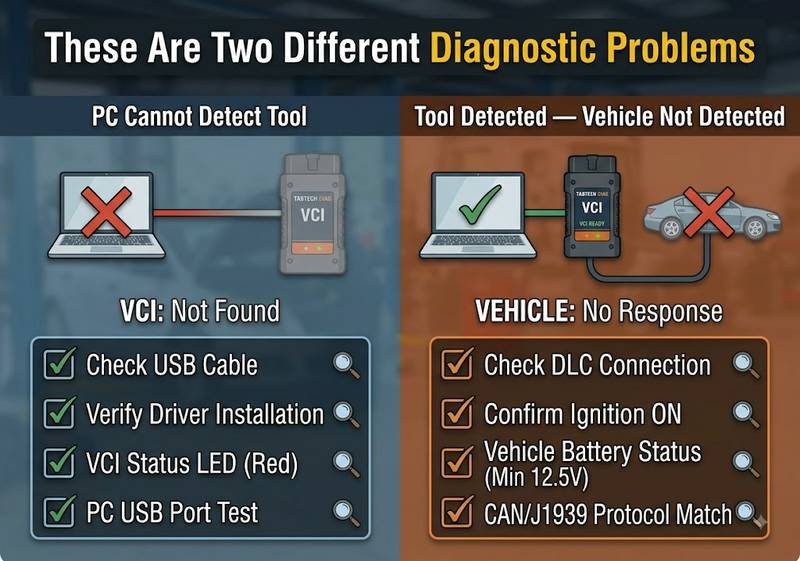
These symptoms must be diagnosed separately. If Windows cannot see the VCI, work on the PC, driver, USB, Ethernet, or VCI power side. If the PC detects the interface but the software cannot identify the vehicle, shift attention to the diagnostic connector, ignition status, vehicle power, selected protocol, network communication, and compatibility.
Situation A — Computer Does Not Detect the Interface
Check:
- USB cable.
- Direct USB port.
- Windows Device Manager.
- VCI driver.
- Network adapter where Ethernet is used.
- VCI power.
- Firmware/software compatibility.
Do not troubleshoot the vehicle CAN bus first if the computer cannot communicate with the interface itself.
Situation B — Interface Is Detected, but Vehicle Is Not
Check:
- Correct vehicle selected.
- Ignition state.
- Diagnostic connector power.
- Connector ground.
- Adapter and pin configuration.
- CAN/J1939/DoIP communication as applicable.
- Gateway communication.
- Required authentication.
- Actual vehicle coverage.
Normal vs Abnormal Results
| PC detects VCI | Correct device/driver shown | Unknown/missing device |
| VCI application | Interface status available | Interface offline |
| DLC supply | Close to vehicle supply voltage where specified | No/unstable supply |
| Vehicle identification | VIN or vehicle session established | No vehicle detected |
| ECU scan | Expected modules respond | Many/all modules offline |
| Live data | Plausible changing values | Fixed, missing or implausible values |
| Active test | Command executes where supported | Function unavailable/no response |
Exact electrical test points and expected values should be confirmed from the vehicle’s wiring documentation.
Step-by-Step: How to Choose the Right OBD2 Scanner
Buying a scanner becomes much simpler when the selection process is treated like a diagnostic workflow. Define the vehicles, identify the functions, determine the required communication interfaces, verify software and operating-system requirements, then check update and licensing policies. Only after those questions are answered should price, screen size, and wireless convenience influence the final decision.
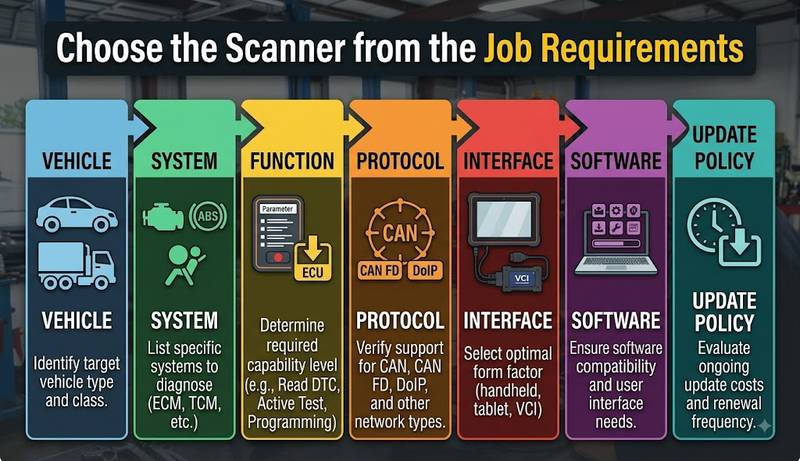
Step 1 — List the Vehicles You Actually Service
Record:
- Make
- Model
- Year
- Engine
- Fuel type
- Vehicle class
For trucks and equipment, also record engine and controller manufacturer.
Step 2 — Define the Required Systems
Examples:
- Engine
- Transmission
- ABS
- SRS
- Body Control Module
- HVAC
- ADAS
- Immobilizer
- Aftertreatment
- Hydraulic/machine controller
Step 3 — Define the Required Functions
Write down exactly what you need:
- Read codes
- Clear codes
- Live data
- Active tests
- Service resets
- Adaptations
- Coding
- Programming
- Calibration
Do not replace this list with “full function.”
Step 4 — Determine the Required Interface
Possible requirements include:
- Generic OBD2
- Enhanced manufacturer diagnostics
- CAN FD
- DoIP
- J2534
- J1939
- OEM VCI
Step 5 — Check Software Requirements
For PC-based tools, confirm:
- Windows version
- 32/64-bit requirement
- VCI driver
- diagnostic software version
- license type
- internet requirement
Step 6 — Check Updates and Support
Ask:
- Are updates optional or required?
- What happens when the update period expires?
- Does older software continue working?
- Does firmware need to match the application?
- Is installation support included?
Step 7 — Ask for an Exact Compatibility Check
A useful request looks like this:
2021 Ford Transit 2.0 diesel. I need full-system diagnosis, DPF functions and injector-related service procedures. Please confirm the compatible tool, required adapter and software version.
That is far more useful than:
Does this scanner support Ford?
Common OBD2 Scanner Buying Mistakes
Most poor scanner purchases come from matching a product to a brand rather than matching it to a job. The same manufacturer may use different ECUs, networks, and security architectures across model years. Another common mistake is assuming that “coding,” “programming” or “full-system” means the same capability on every supported brand.
Mistake 1 — “It Supports Mercedes, So It Supports My Mercedes”
Brand coverage is not enough.
Confirm:
model + year + chassis + ECU + function
Mistake 2 — Assuming Full-System Means Programming
A scanner may access every installed ECU but still lack programming capability.
Mistake 3 — Buying J2534 Without Checking OEM Software
J2534 specifies the pass-thru interface; OEM software, subscription, and authorization are separate considerations.
Mistake 4 — Buying a Car Scanner for Heavy-Duty Work
If J1939, truck connectors, or OEM truck software are required, use equipment designed for that workflow.
Mistake 5 — Ignoring Computer Compatibility
PC-based tools can fail because of:
- unsupported Windows version;
- incorrect drivers;
- disabled network adapter;
- software conflicts;
- antivirus restrictions;
- mismatched VCI firmware.
Mistake 6 — Updating a Working System Without Checking Compatibility
Diagnostic software, VCI firmware, and drivers should be treated as one working environment.
Do not assume that the newest component version is always compatible with the rest of the system.
How to Verify the Repair After Using a Diagnostic Scanner
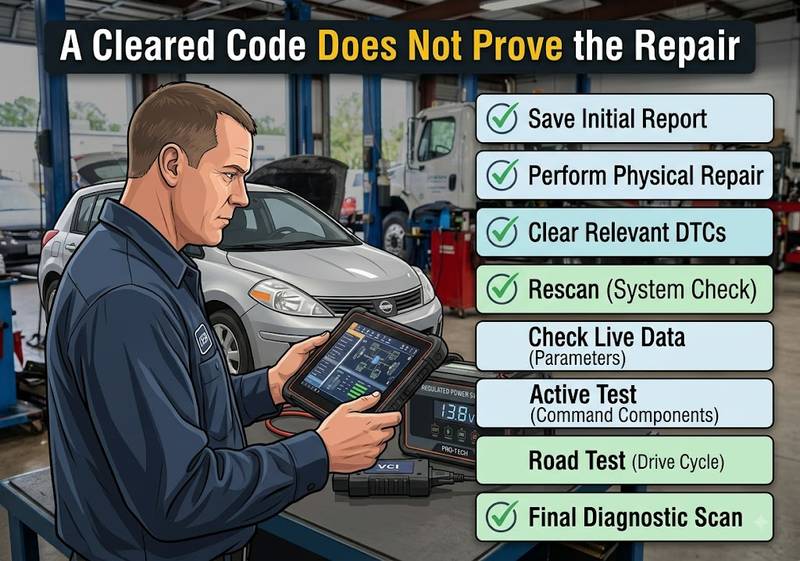
A repair is not complete when the DTC disappears. After repairing the suspected fault, clear codes only when appropriate, restart the diagnostic session, rescan the vehicle, and compare live data with the pre-repair condition. When the repair involves an actuator, sensor, module or calibration, perform the appropriate functional test or relearn before returning the vehicle.
Recommended verification sequence:
- Save the original diagnostic report.
- Complete the repair.
- Clear relevant fault codes where appropriate.
- Cycle ignition according to the service procedure.
- Perform another full scan.
- Confirm repaired modules communicate normally.
- Review live data.
- Run the relevant active test.
- Complete required adaptation or calibration.
- Road-test or operate the machine under the conditions that originally produced the fault.
- Perform a final scan.
- Save the post-repair report.
For emissions-related OBD diagnosis, remember that clearing codes can also reset readiness information, so monitor status may need to be completed again before an inspection. CARB explains that OBD systems store malfunction information and monitor emissions-related systems continuously under defined diagnostic conditions.
When Should You Stop the Diagnostic or Programming Procedure?
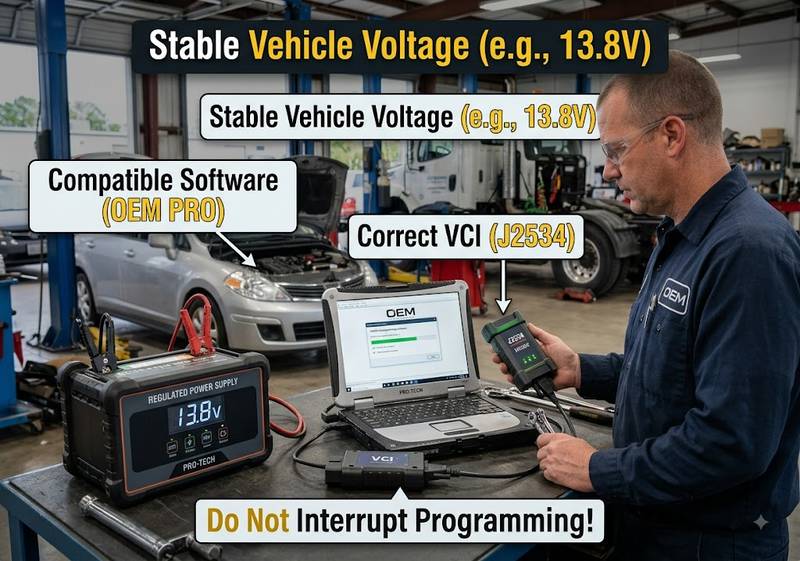
Stop when continued testing creates a meaningful risk of damaging a control unit, losing communication or compromising a safety-critical system. Low or unstable voltage, unknown programming compatibility, incorrect ECU identification, damaged diagnostic wiring or an interrupted programming session should be resolved before proceeding. Safety-critical, high-voltage and security-related work also requires the correct procedures and authorization.
Stop and investigate before continuing if:
- vehicle voltage is unstable;
- diagnostic power disappears intermittently;
- the interface repeatedly disconnects;
- the wrong ECU or vehicle may have been selected;
- programming software requests an unsupported interface;
- an ECU write has already failed;
- CAN/network wiring appears shorted;
- the procedure involves an HV battery without appropriate training;
- airbag/SRS work requires procedures you cannot verify;
- immobilizer/security authorization is unavailable.
Do not experiment with coding or programming on a customer vehicle to see whether a function works.
Choosing Diagnostic Products for Your Workshop
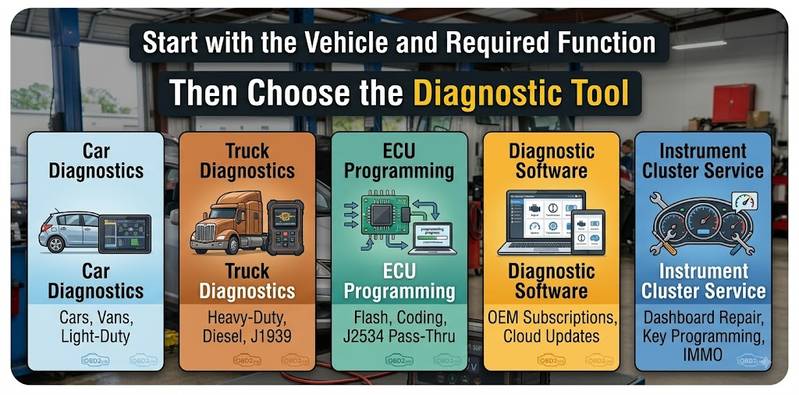
The useful way to select products is to match each category to a specific workshop problem. OBD2.LTD separates passenger-car diagnostics, heavy-duty diagnostics, ECU programming, diagnostic software and instrument-cluster service equipment because these jobs do not share one universal interface. Before ordering, verify the vehicle, year, controller, communication interface, software version and exact target function.
For Passenger Cars
Use the Car Diagnostic Tools
category when your primary work involves passenger-car ECU scanning, live data, full-system diagnostics or manufacturer-specific service functions.
Best suited to: independent car repair shops and brand specialists.
Confirm before ordering: make, model, year, chassis, ECU and required function.
For Trucks, Fleets and Heavy Equipment
when your work requires commercial-vehicle interfaces, engine-specific applications or heavy-duty diagnostic networks.
OBD2.LTD currently groups equipment such as NEXIQ, JPRO, CAT, VOCOM and John Deere diagnostic solutions within this category.
Best suited to: truck workshops, fleets and heavy-equipment technicians.
Confirm before ordering: vehicle/engine manufacturer, year, connector, software and function.
For ECU Reading, Writing and Tuning Work
category is relevant when the job requires controller reading, writing, backup or programming rather than ordinary fault-code diagnosis.
Best suited to: ECU repair and programming specialists.
Confirm before ordering: ECU manufacturer, ECU number, processor, OBD/Bench/Boot protocol and checksum requirements.
For PC-Based OEM or Specialist Diagnostics
category is more appropriate when you already have or plan to buy the compatible VCI and need the corresponding diagnostic environment.
Confirm before ordering:
- software version;
- Windows version;
- VCI model;
- driver;
- licensing;
- vehicle coverage.
Installing software successfully does not prove that a particular vehicle function is supported.
For Authorized Instrument-Cluster Service
category should be used only for lawful instrument-cluster replacement, repair, or authorized data restoration.
Mileage-related regulations vary by jurisdiction. Equipment should not be used to conceal a vehicle’s actual mileage or misrepresent vehicle history.
FAQ
What is the difference between an OBD2 code reader and a full-system diagnostic scanner?
A generic OBD2 reader primarily accesses standardized emissions-related diagnostic information. A full-system scanner may additionally communicate with manufacturer-specific modules such as ABS, SRS, transmission, and body controllers. Exact access still depends on the vehicle and scanner software. CARB’s OBD II definition is primarily emissions-focused.
Will any OBD2 scanner work on every 1996-and-newer vehicle?
No. In California, OBD II requirements apply to 1996-and-newer gasoline and alternate-fuel passenger cars and trucks, and 1997-and-newer diesel passenger cars and trucks, with some earlier exceptions. That does not mean every scanner supports every manufacturer-specific ECU or advanced function, and requirements differ between markets.
What does bi-directional control mean?
Bi-directional control allows a scan tool to send a supported command to a vehicle controller, such as activating a relay, valve, fan, or other actuator. Support is vehicle- and controller-specific.
Do I need J2534 for ECU programming?
You may need an SAE J2534 pass-thru interface when the OEM programming application uses that standard. J2534 defines the PC-to-vehicle interface, but you must separately verify OEM software, subscription, vehicle coverage, and authorization.
Can one scanner diagnose cars and heavy-duty trucks?
Some products support both, but do not assume passenger-car OBD2 support equals full heavy-duty support. Commercial vehicles may require SAE J1939, different connectors, dedicated software, or manufacturer-specific interfaces.
Why does my computer detect the VCI but the VCI cannot connect to the vehicle?
The PC-to-VCI connection and VCI-to-vehicle connection are separate. If Windows detects the interface, check vehicle ignition, DLC power and ground, the adapter, selected vehicle/protocol, network communication, and actual vehicle coverage before reinstalling the PC driver.
Can an OBD2 scanner program an ECU?
Some professional tools can perform certain programming operations, but OBD2 compatibility alone does not imply ECU programming. Programming support must be confirmed for the controller, vehicle, interface, and software combination.
Should I buy diagnostic software without the interface?
Only when you already have a confirmed compatible VCI or intend to purchase one. Check the exact software version, Windows version, driver, interface, and licensing requirements before ordering software alone.
Final OBD2 Scanner Buying Checklist
Before buying, confirm:
- Vehicle make and model.
- Model year
- Engine
- ECU or controller
- Passenger-car or heavy-duty application
- Required systems
- Read/Clear DTC requirement
- Live-data requirement
- Bi-directional test requirement
- Coding requirement
- Programming requirement
- Calibration/relearn requirement
- CAN FD requirement
- DoIP requirement
- J2534 requirement
- J1939 requirement
- Required adapter
- Diagnostic software version
- Windows compatibility
- Driver/firmware compatibility
- Update policy
- Online or subscription requirements
- Technical-support availability
Conclusion
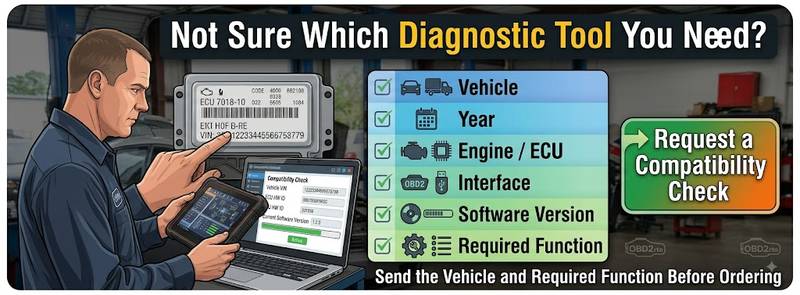
The best OBD2 scanner is not the one with the longest feature list. It is the tool that reliably supports your vehicles, controllers, communication protocols, and required operations. Start with the work you perform, determine whether you need basic OBD2, full-system diagnostics, heavy-duty communication, coding or ECU programming, and verify exact compatibility before ordering.
For passenger-car diagnostics, explore Car Diagnostic Tools.
. For commercial vehicles and fleet repair, use Truck / Heavy-Duty Diagnostic Tools. ECU specialists can compare ECU Chip Tuning Tools, while technicians building PC-based systems can review Auto Diagnostic Software.
Before ordering, send the vehicle year, engine/controller, required interface, software version, and target function for a compatibility check.